Do AI Crawlers Read Your HTML or Your WordPress REST API? 66 Days of Server Logs
If you have spent time adding structured data to your WordPress site — Article schema, FAQ blocks, a carefully written meta description — there is an uncomfortable question sitting underneath all of it. Does any of that actually reach the AI engines you added it for?
The worry has a specific shape. WordPress ships a public REST API. Every post on your site is available as clean JSON at /wp-json/wp/v2/posts/123, with no theme, no layout, and no <head>. If an AI crawler wanted your content, that would be the efficient way to take it — and it would skip everything a plugin puts in your page head. So we pulled 66 days of raw Nginx logs off our own server and counted.
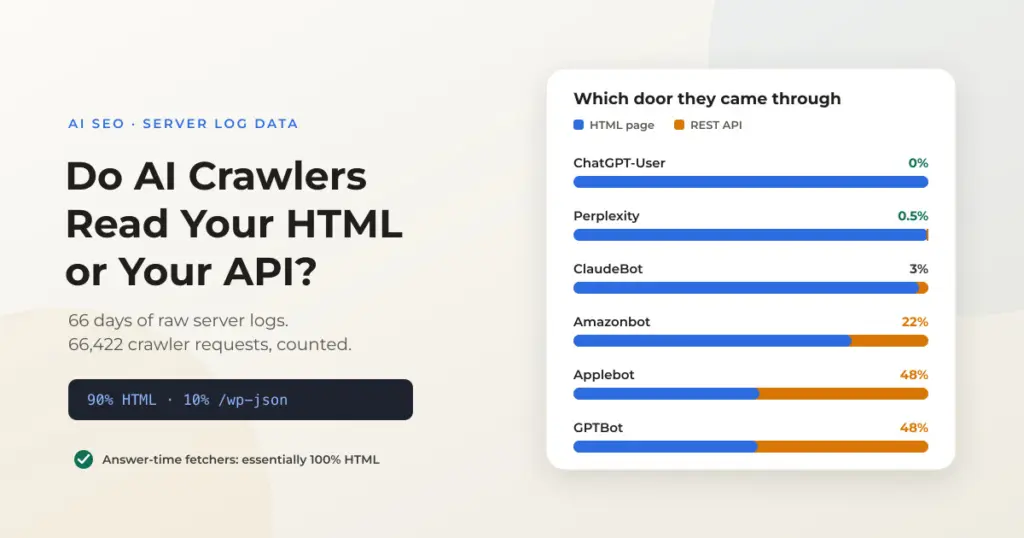
Quick Summary: Across 66,422 AI and search crawler requests over 66 days, 90% were for rendered HTML and 10% for the WordPress REST API. But the split is not evenly spread. The crawlers that fetch your page at the moment someone asks a question — ChatGPT-User, Claude-User, Perplexity — used HTML essentially 100% of the time. The REST API users are training crawlers: GPTBot and Applebot took roughly half their content that way, Amazonbot around a fifth. That matters because schema in your page <head> does not appear in the REST API, while schema embedded in the post body does.
In This Article
- What we measured
- The split: 90% HTML, 10% REST API
- The pattern tracks what each bot is for
- Why where your schema lives decides whether it survives
- The trap: your own editor looks like a bot
- What to do about it
- How to run this check on your own server
- Frequently asked questions
What We Measured
This is first-party data from one production WordPress site — imagewize.com, running Bedrock and Trellis on a Hetzner server. We read the raw Nginx access logs, including the rotated and gzipped archives, covering 66 distinct days through September 1, 2026. That is 66,422 requests from identifiable AI and search engine crawlers.
Every request was classified by user agent into a named crawler, and by path into one of five buckets: rendered HTML pages, REST API calls under /wp-json/, static assets such as CSS and images, robots.txt, and sitemap files. The question was simple — when a crawler wants the content of a post, which door does it come through?
One caveat worth stating up front: user agents can be forged, and this is a single site with a technical audience. The direction of the finding is clear and consistent across nine weeks, but the exact percentages are ours, not a universal constant. Which is why the last section shows you how to run the same count on your own logs.
The Split: 90% HTML, 10% REST API
Counting only content requests — HTML pages and REST API calls, setting aside assets, robots.txt and sitemaps — the result is 55,130 HTML requests against 5,913 REST API requests. Roughly nine in ten content fetches came through the front door, as rendered HTML.
| Crawler | All requests | HTML | REST API | REST share of content |
|---|---|---|---|---|
| Googlebot | 32,732 | 31,648 | 659 | 2% |
| Amazonbot | 10,887 | 8,471 | 2,343 | 22% |
| Anthropic ClaudeBot | 5,219 | 2,981 | 82 | 3% |
| Meta AI | 4,387 | 3,851 | 228 | 6% |
| Applebot | 3,621 | 1,609 | 1,463 | 48% |
| ByteDance Bytespider | 2,130 | 1,324 | 303 | 19% |
| Bingbot | 2,022 | 1,334 | 200 | 13% |
| OpenAI ChatGPT-User | 1,829 | 1,829 | 0 | 0% |
| OpenAI GPTBot | 1,039 | 495 | 458 | 48% |
| OpenAI SearchBot | 1,037 | 438 | 174 | 28% |
| YouBot | 699 | 421 | 0 | 0% |
| Perplexity | 460 | 391 | 2 | 0.5% |
| Anthropic Claude-User | 237 | 215 | 1 | 0.5% |
| DuckDuckBot | 123 | 123 | 0 | 0% |
The headline number is reassuring, but the averages hide the interesting part. GPTBot took 48% of its content from the REST API. ChatGPT-User, from the same company, took precisely none. Those two numbers sitting next to each other are the actual story.
The Pattern Tracks What Each Bot Is For
AI crawlers are not one category of thing. We broke down the differences in which AI bots are crawling your WordPress site, but the short version is that they do three different jobs: gathering training data, building a search index, and fetching a specific page in real time because a user just asked about it. Sorting the REST API numbers by that grouping makes the pattern jump out.
Answer-time fetchers read HTML, full stop
When someone asks ChatGPT about a page and the model goes to fetch it, that request arrives as ChatGPT-User. Over 66 days we logged 1,829 of them. Not one touched the REST API. Claude-User: 215 HTML requests, one REST call. Perplexity: 391 against 2.
These are the requests that matter most for citations, because they happen at the moment an engine is deciding what to say about you. They fetch the page a human would see. Whatever is in that rendered HTML is what the model reads.
Which pages those fetches land on is its own story: what AI engines actually read on your website.
Training crawlers are the REST API users
The three heaviest REST API consumers are all bulk collectors: GPTBot at 48%, Applebot at 48%, Amazonbot at 22%. This makes practical sense. If you are archiving an entire site rather than answering one question, the REST API gives you clean, paginated, parse-ready JSON without a rendering step. It is the cheaper path when volume is the goal.
Amazonbot deserves a note. It was our single largest AI crawler by volume after Googlebot, and 2,343 of its requests went to the REST API — many of them to /wp-json/oembed/1.0/embed, an endpoint that returns title, author and a thumbnail rather than article text. Heavy traffic, thin extraction.
ClaudeBot went the other way, and was the best-behaved crawler in the set: 2,981 HTML pages, only 82 REST calls, and 1,113 robots.txt plus 1,005 sitemap requests. It checks the rules and follows the map far more often than it takes anything.
Why Where Your Schema Lives Decides Whether It Survives
Here is the part that changes what you should actually do. There are two places JSON-LD structured data can live on a WordPress post, and they behave completely differently depending on which door a crawler comes through.
- Head-injected schema. Every SEO plugin — Yoast, Rank Math, The SEO Framework — writes its JSON-LD into the page
<head>at render time. This is invisible to the REST API. A crawler requesting/wp-json/wp/v2/posts/123never sees a single line of it. - Body-embedded schema. Schema placed inside the post content itself — for us, a Custom HTML block holding a
<script type="application/ld+json">tag — is part ofpost_content. It comes back inside thecontent.renderedfield of the REST API response, intact.
We checked this against a live post rather than assuming it. The rendered HTML page emits three JSON-LD blocks: a WebSite and WebPage graph from the SEO plugin, plus our own FAQPage and Article blocks. The REST API response for the same post contains the Article and FAQPage markup — and none of the plugin’s head output.
For the developers: verifying which schema survives the REST API
Two requests against the same post, one through each door. The first counts JSON-LD blocks in the rendered page; the second checks whether they survive into the API response.
# What the HTML page emits
curl -s https://example.com/your-post/ \
  | grep -o 'application/ld+json' | wc -l

# What the REST API returns for the same post
curl -s "https://example.com/wp-json/wp/v2/posts/123" \
  | python3 -c 'import sys,json; \
c=json.load(sys.stdin)["content"]["rendered"]; \
print("ld+json in body:", "application/ld+json" in c); \
print("Article:", "Article" in c, "| FAQPage:", "FAQPage" in c)'
If the second command prints False while the first returns a non-zero count, all of your structured data is head-injected and none of it reaches a REST-consuming crawler. Moving the Article block into the post body closes that gap without removing anything the plugin does.
We had been embedding Article and FAQ schema directly in the post body for a different reason entirely — The SEO Framework does not emit Article markup for posts, so we hand-authored it. That decision turned out to also be the thing that keeps our schema visible to GPTBot, Applebot and Amazonbot. It was luck rather than foresight, but it is a repeatable piece of luck.
The Trap: Your Own Editor Looks Like a Bot
This investigation started because an off-the-shelf log monitoring script told us AI crawlers were hammering our REST API. Its report showed a long list of /wp-json/wp/v2/posts/ requests filed under AI crawler activity. That report was wrong, and the reason is worth knowing before you run any similar tool.
The two biggest sources of REST API traffic on the site were a Safari user agent and a Chrome user agent — recent desktop browser versions, not crawlers. That is the WordPress block editor. Gutenberg is a REST API client; every time you open a post to edit it, autosave fires, or you load the post list, the browser makes authenticated calls to /wp-json/wp/v2/. On a site where one person publishes regularly, editorial work can easily outweigh genuine bot traffic on those endpoints.
Note: Before drawing any conclusion from a bot report, check whether the tool separates authenticated admin traffic from anonymous crawler traffic. If it groups requests by URL pattern rather than by verified user agent, your own editing sessions will show up as bot activity — and the busier you are, the worse the distortion.
One more artifact showed up in the same data: a crawler identifying itself as AteveSearchSourceUrlDiscovery/0.1 with a contact address of crawler@example.com. A placeholder email in a production user agent is not a good sign. It is a reminder that not everything hitting your API is one of the named, documented crawlers, and that watching your logs for unfamiliar agents is worth the few minutes it takes.
What To Do About It
The practical takeaways are narrower than the panic that started this, which is usually how log data works.
- Keep optimizing the rendered page. Nine in ten AI content requests, and effectively every answer-time citation fetch, read your HTML. Headings, clear answers near the top, clean semantics and page speed all still do the work you hoped they did.
- Put Article and FAQ schema in the post body, not only the head. This costs nothing, does not conflict with your SEO plugin, and is the difference between reaching a REST-consuming training crawler and not.
- Do not block the REST API to stop AI crawlers. It is 10% of their content traffic, and the block editor, mobile apps and many plugins depend on those endpoints. You would break your own site to close a small gap.
- Decide about Amazonbot on volume, not fear. It was our second-heaviest crawler and mostly pulled oEmbed metadata. If that bandwidth bothers you, rate-limit it in Nginx; if it does not, leave it.
- Check your own logs before acting on anyone’s advice, including ours. Every site’s crawler mix is different, and aggregate reports about “AI traffic” are easy to misread.
Worth noting what this does not settle: whether structured data changes how often an AI engine cites you. These logs show what gets fetched, not what gets used. We have looked at that gap between fetching and acting before, when we checked whether llms.txt actually works — and the answer there was considerably less flattering to the hype.
How to Run This Check on Your Own Server
If you have SSH access and standard Nginx or Apache logs, you can check this on your own site in about a minute. The awk one-liner is tucked away below for anyone who wants it.
For the developers: the one-liner that counts HTML vs REST hits per crawler
Run this from your log directory. It reads the rotated .gz archives as well as the current log, so you get weeks of history rather than today, and it buckets every request by crawler and by whether the path starts with /wp-json.
cd /path/to/your/logs

{ zcat -f access.log.*.gz; cat access.log.1 access.log; } | awk -F'"' '
{
  split($2, r, " "); path = r[2]; ua = $6;
  if (ua ~ /GPTBot/)             bot = "GPTBot";
  else if (ua ~ /ChatGPT-User/)  bot = "ChatGPT-User";
  else if (ua ~ /ClaudeBot/)     bot = "ClaudeBot";
  else if (ua ~ /PerplexityBot/) bot = "Perplexity";
  else if (ua ~ /Amazonbot/)     bot = "Amazonbot";
  else if (ua ~ /Applebot/)      bot = "Applebot";
  else if (ua ~ /Googlebot/)     bot = "Googlebot";
  else next;
  kind = (path ~ /^\/wp-json/) ? "REST" : "HTML";
  c[bot "|" kind]++;
}
END { for (k in c) print c[k], k }' | sort -rn
Read the output as pairs. A crawler with a high REST count relative to its HTML count is taking your content through the API, which means only body-embedded schema is reaching it. A crawler that is almost entirely HTML is reading the same page your visitors do.
Frequently Asked Questions
- Do AI crawlers read my rendered HTML or the WordPress REST API? Overwhelmingly the rendered HTML. Across 66,422 crawler requests over 66 days, 90% of content fetches were HTML pages and 10% were REST API calls. The crawlers that fetch a page when a user asks a question — ChatGPT-User, Claude-User and Perplexity — used HTML almost exclusively.
- Is my JSON-LD structured data wasted effort for AI search? No. Because most AI crawler traffic reads the rendered page, schema in your HTML does reach them. The one gap is crawlers that use the REST API, which never see JSON-LD injected into the page head by an SEO plugin.
- Which AI crawlers use the WordPress REST API most? In our logs, GPTBot took 48% of its content through the REST API, Applebot 48% and Amazonbot 22%. All three are bulk or training crawlers, where clean JSON is cheaper to process than rendered HTML.
- Does schema in the post body show up in the REST API? Yes. JSON-LD placed inside the post content is part of
post_contentand is returned in thecontent.renderedfield of the REST API response. Schema injected into the page head by an SEO plugin is not. - Should I block the WordPress REST API to stop AI crawlers? No. It accounts for only about 10% of AI crawler content requests, and the block editor, the WordPress mobile app and many plugins rely on those endpoints. Blocking it breaks your own site for a small gain.
- Why does my monitoring tool show AI bots hitting the REST API so heavily? It may be counting your own admin traffic. The WordPress block editor is a REST API client, so every editing session generates authenticated calls to
/wp-json/wp/v2/. Tools that group by URL pattern rather than verified user agent will report those as bot activity.
Need WordPress SEO Support for Your Business?
We handle WordPress SEO for SMEs — from technical foundations (schema, crawlability, Core Web Vitals) to on-page optimization and content strategy. Fixed-price audits and ongoing support available.
- Technical SEO audit and implementation
- Schema markup and structured data
- Core Web Vitals and page speed optimization
- On-page SEO and content strategy