Ixian: A Lean Full-Site-Editing WordPress Theme for Service Businesses and SaaS Companies
Go looking for a WordPress theme and you will find, over and over, a theme built to sell physical products. Shop grids, cart pages, product filters, forty hero variations you scroll past on the way to the one you want. That is a reasonable thing for a theme to be. It is just not what most of the businesses we work with are doing. A consultancy, a design agency, a bookkeeping firm, a small software product — none of them need a checkout. They need one homepage that makes a convincing argument, a pricing page, somewhere to show past work, and a contact page that works.
Ixian is the theme we built for those sites. It is a full-site-editing WordPress theme aimed squarely at service businesses and SaaS products: one consistent design system, five ready-made starter pages, and no assumption anywhere that you are running a store. It is live on our demo site now, and this post walks through what is actually in it — the business case first, with the code tucked into expandable sections for anyone who wants it.
Quick Summary: Ixian is a lean full-site-editing WordPress theme for service businesses and SaaS companies. It is a fork of Aviendha, our minimal FSE starter theme, re-colored and given five full-page starter patterns — Homepage, Pricing, About, Contact and Portfolio — built from the Aludra block library plugin that supplies the mega menu, carousel, FAQ accordion and pricing tiers. The design system is a graphite-and-indigo palette whose text colors all clear WCAG 2.1 AA on the theme’s backgrounds, with a dark Twilight variation and two self-hosted variable fonts totaling 72KB. It is live at demo.imagewize.com/ixian, and the code is public on GitHub under GPL v3.
What’s Actually on the Demo
Most theme demos are gray boxes and lorem ipsum, which tells you nothing about whether the layout can carry a real argument. So we filled the homepage starter page in with a made-up product — a deployment platform — and wrote it properly: a real headline, real pricing, real FAQ answers. Top to bottom, the page runs:
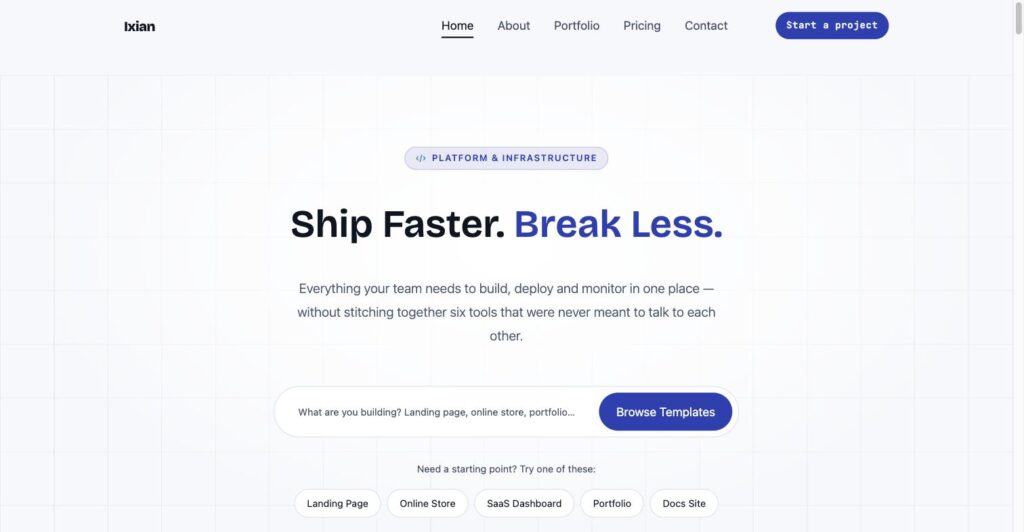
- A centered hero with a headline, a search bar, and quick-pick chips (Landing Page, Online Store, SaaS Dashboard, Portfolio, Docs Site)
- A trust bar of credibility badges — certification, uptime, customer count, support response time
- Headline metrics in large type
- A three-step “how it works” section with a visual timeline
- A filterable “old way vs. our way” comparison table
- A deeper comparison table across four dimensions
- Persona cards for three different buyer types
- A capability grid and a centered compatibility section
- A three-tier pricing table
- Client quotes, a second feature-comparison matrix, a centered FAQ accordion, and a plan-inclusions grid
None of that structure is specific to software. Swap “deployment platform” for “bookkeeping firm” or “accessibility consultancy” and the same sections — hero, trust bar, metrics, comparison, pricing, FAQ — carry a service business just as well. That is the point of building the demo as a real pitch rather than placeholder text: it shows the layout can hold an argument, not just fill a screen.
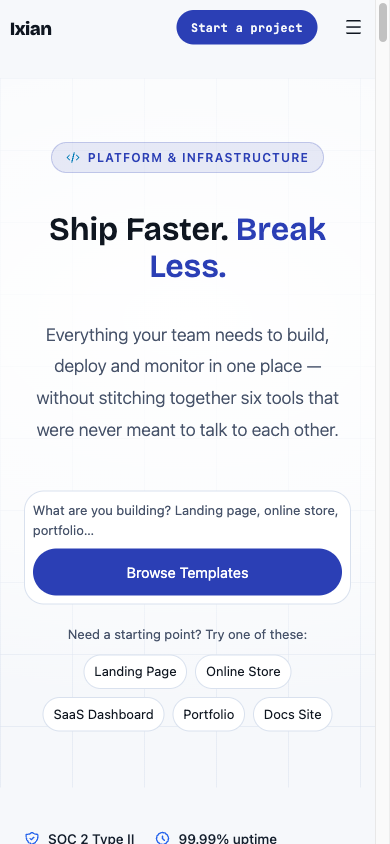
The layout gets checked on a phone too, not just assumed to carry over. A round of fixes released as 1.0.1 straightened out three mobile-specific problems: the hero’s search bar now stacks into its own full-width row on narrow screens instead of squeezing the “Browse Templates” button down into an unreadable blob, the mobile nav overlay’s close button opens back where the hamburger was rather than landing flush in the literal corner of the screen, and the nav link list stretches to the full padded width instead of clipping against the modal edge on a longer label or a larger accessibility text size.

Five Starter Pages, Not Fifty Fragments
Ixian ships exactly five full-page starters: Homepage, Pricing, About, Contact and Portfolio. Insert one, replace the words with your own, and you have a finished page — not a pile of sections you still have to assemble in the right order.
That is a deliberate contrast with a theme like Elayne, which ships 143 patterns across five industry verticals with eight style variations, because Elayne’s job is to cover a wide spread of small-business niches straight out of the box. Ixian’s job is narrower, so the pattern set is narrower too. Here is how our three themes divide the work:
| Theme | Built for | Approach |
|---|---|---|
| Aviendha | Developers starting a new build | Minimal starter theme — design system and store templates, no patterns at all |
| Elayne | SME verticals (spa, legal, food & beverage, home improvement, nail salon) | 143 patterns, 8 style variations |
| Ixian | Service businesses & SaaS products | Design system + 5 full-page starters, blocks over patterns |
Aviendha is the one worth explaining, because it is where Ixian came from. It is a deliberately minimal starter theme — a design system, WooCommerce templates and style variations, and no theme-level patterns whatsoever. It exists to be forked. Ixian is that fork: same skeleton, a new palette, and the five starter pages added on top.
The reason the pattern count stays at five rather than fifty is that reusable pieces belong in a plugin, not in theme files. Ixian contains no blocks of its own. Every content block on that demo page — mega menu, carousel, FAQ accordion, pricing tiers, comparison tables — comes from Aludra, our shared block library plugin. A starter page is just an arrangement of those blocks, which keeps it thin and keeps it working when the blocks improve.
In practice that means a new section type gets built out of existing blocks first, and only gets promoted into a real Aludra block when a pattern genuinely cannot express it. Fewer things to maintain, and every improvement lands everywhere at once.
For the developers: what a starter pattern is actually made of
Each of the five is a plain PHP file in patterns/, registered by WordPress from its docblock header. Nothing exotic — the Block Types: core/post-content line is what makes it offer itself when you open an empty page:
<?php
/**
 * Title: Pricing
 * Slug: ixian/page-pricing
 * Categories: ixian
 * Block Types: core/post-content
 * Description: A pricing page — intro hero, trust bar, the three-tier
 *              spec-sheet pricing table, a billing-focused FAQ accordion
 *              and a closing call to action.
 *
 * @package Ixian
 */
Below that header it is all block markup, and almost all of it is aludra/*. Counting block openings across the five files gives a good picture of which blocks are doing the work:
$ grep -oh "wp:aludra/[a-z-]*" patterns/*.php | sort | uniq -c | sort -rn
  64 wp:aludra/comparison-cell
  24 wp:aludra/spine-section
  16 wp:aludra/faq-tab-answer
  16 wp:aludra/comparison-row
  12 wp:aludra/stat-item
  10 wp:aludra/feature-cards
   8 wp:aludra/trust-bar
   8 wp:aludra/hero-banner
   ...
The theme’s own ixian pattern category is registered in functions.php, otherwise the inserter files these under an unlabeled heading:
register_block_pattern_category(
	'ixian',
	array(
		'label'       => __( 'Ixian', 'ixian' ),
		'description' => __( 'Full page layouts composed from the Aludra block library.', 'ixian' ),
	)
);
Ixian also calls remove_theme_support( 'core-block-patterns' ), so the inserter shows Ixian’s five and Aludra’s, not core’s default library on top of them.
For the developers: why Ixian ships no custom blocks
WordPress.org’s theme-review guidelines prohibit a theme from registering its own blocks — a block is functionality, and functionality belongs in a plugin so it survives a theme switch. Aviendha, Elayne with its companion Elayne Blocks plugin, and Ixian all follow the same split: the theme owns theme.json, templates and template parts; a separate plugin owns the blocks.
The one theme-side hook Ixian needs to make that work is registering a menu template part area, since Aludra’s mega-menu block expects its host theme to expose one:
function ixian_template_part_areas( $areas ) {
	$areas[] = array(
		'area'        => 'menu',
		'area_tag'    => 'nav',
		'label'       => __( 'Menu', 'ixian' ),
		'description' => __( 'Template parts for navigation and mega menu content.', 'ixian' ),
		'icon'        => 'navigation',
	);
	return $areas;
}
add_filter( 'default_wp_template_part_areas', __NAMESPACE__ . 'ixian_template_part_areas' );
That single filter is what makes mega-menu template parts show up under Appearance → Editor → Patterns → Template Parts → Menus in the Site Editor. Everything else — the mega-menu markup itself, the carousel, the FAQ accordion — lives in Aludra, not in the theme.
What Makes Ixian a Lean FSE Block Theme
The practical promise of a full-site-editing block theme is that you can change how the site looks from inside WordPress, without a developer and without a page builder. That only holds if the theme keeps its design decisions in one place. Ixian keeps all of them — color, type, spacing, corner radius — in a single configuration file that the WordPress editor reads directly. Change a color there and it changes everywhere, including inside the editor, because there is no separate stylesheet quietly overriding it.
The palette itself is where Ixian departs most visibly from the theme it forked. Aviendha’s default is warm — rose on cream, which suits a shop. Ixian’s is cool: near-black text, an indigo primary, a teal accent, and two very light neutrals for cards and section backgrounds. It reads as a platform or a professional service rather than a storefront. Every text color in the palette clears WCAG 2.1 AA contrast against the theme’s light backgrounds, and the dark variation clears it comfortably too.
Typography leans the same direction. Headings use Bricolage Grotesque; labels, eyebrows and numbers use JetBrains Mono — setting a figure like “0.9s median deploy time” in a monospace face is what makes it read as a measurement rather than a marketing claim. Both are self-hosted as single variable-font files, 72KB for the pair, so the site makes no request to Google’s servers for fonts and does not download a separate file per weight. That is a speed win and, for European clients, one fewer third party receiving your visitors’ IP addresses.
For the developers: the color palette in full
Fifteen named slugs in theme.json. Aludra’s block styles and Ixian’s patterns reference these slugs directly, so renaming one means checking every patterns/*.php file in both repos first:
{ "name": "Base",           "slug": "base",           "color": "#F6F8FB" }
{ "name": "Tertiary",       "slug": "tertiary",       "color": "#EAEFF7" }
{ "name": "Border Light",   "slug": "border-light",   "color": "#D9E1EE" }
{ "name": "Contrast",       "slug": "contrast",       "color": "#0F1620" }
{ "name": "Main",           "slug": "main",           "color": "#16202E" }
{ "name": "Primary",        "slug": "primary",        "color": "#2B3FB5" }
{ "name": "Accent",         "slug": "accent",         "color": "#0E7490" }
{ "name": "Secondary",      "slug": "secondary",      "color": "#47536A" }
{ "name": "Main Accent",    "slug": "main-accent",    "color": "#5C6B82" }
{ "name": "Primary Accent", "slug": "primary-accent", "color": "#E5E9FA" }
{ "name": "Primary Alt",    "slug": "primary-alt",    "color": "#1E2C86" }
{ "name": "White",          "slug": "white",          "color": "#FFFFFF" }
{ "name": "Terracotta",     "slug": "terracotta",     "color": "#B34309" }
{ "name": "Sand Deep",      "slug": "sand-deep",      "color": "#AFBCD0" }
{ "name": "Indigo",         "slug": "indigo",         "color": "#101A3D" }
Contrast ratios for the text colors against base (#F6F8FB) and tertiary (#EAEFF7), the two backgrounds body copy actually sits on — AA for normal text needs 4.5:1:
                on base    on tertiary
contrast         17.08        15.73
main             15.42        14.21
primary           7.96         7.33
secondary         7.27         6.70
terracotta        5.30         4.88
main-accent       5.09         4.69
accent            5.04         4.64   <- tightest pair
white on primary  8.46   |   white on accent  5.36
The last four slugs (white, terracotta, sand-deep, indigo) are surface and decorative colors, not body-text colors — sand-deep in particular is a divider tone and should never carry small text on a light background. The twilight variation keeps all fifteen slugs and swaps only the hex values, so a pattern built for one style variation works unmodified in the other.
For the developers: the fluid type and spacing scale
Nine font sizes and six spacing steps, every one of them a clamp() so the layout scales continuously between mobile and desktop instead of jumping at breakpoints. No media queries needed in pattern markup:
fontSizes
  xx-small  clamp(0.65rem, 0.62rem + 0.15vw, 0.7rem)
  x-small   clamp(0.72rem, 0.68rem + 0.2vw,  0.8rem)
  small     clamp(0.8rem,  0.75rem + 0.25vw, 0.9rem)
  base      clamp(0.9rem,  0.85rem + 0.25vw, 1rem)
  medium    clamp(1rem,    0.95rem + 0.3vw,  1.125rem)
  large     clamp(1.25rem, 1.1rem  + 0.75vw, 1.75rem)
  x-large   clamp(1.75rem, 1.4rem  + 1.75vw, 2.5rem)
  xx-large  clamp(2.25rem, 1.6rem  + 3vw,    3.5rem)
  display   clamp(3rem,    2rem    + 5vw,    5rem)

spacingSizes
  2-x-small clamp(0.25rem,  1.5vw, 0.5rem)
  x-small   clamp(0.375rem, 2vw,   0.75rem)
  small     clamp(0.5rem,   2.5vw, 1rem)
  medium    clamp(1.5rem,   4vw,   2rem)
  large     clamp(2rem,     5vw,   3rem)
  x-large   clamp(3rem,     7vw,   5rem)
Both fonts are registered as single variable files covering their whole weight range, which is why two faces cost 72KB total rather than one request per weight:
{
  "name": "Display",
  "slug": "display",
  "fontFamily": "'Bricolage Grotesque', 'Segoe UI', system-ui, sans-serif",
  "fontFace": [{
    "fontFamily": "Bricolage Grotesque",
    "fontWeight": "200 800",
    "fontStyle": "normal",
    "src": [ "file:./assets/fonts/bricolage-grotesque-variable.woff2" ]
  }]
}
$ ls -l assets/fonts/
41344 bricolage-grotesque-variable.woff2
31432 jetbrains-mono-variable.woff2Body text uses a system font stack with no fontFace at all, so the first paint needs no web font at all.
One Click to a Dark Style Variation
Ixian ships a second style variation called Twilight — a dark, cool-toned palette layered onto the identical design system. Switching to it from Appearance → Editor → Styles takes seconds and breaks nothing: same starter pages, same layouts, same spacing, just re-colored. For a software product or a developer-facing service, a dark option is frequently the expected default rather than a novelty.
Twilight comes down from Aviendha, which ships its own version of the same variation. Inheriting it is part of the point of forking a starter theme: the mechanism is already proven, and Ixian only has to supply new colors.
WooCommerce Stays Out of the Way
Because Ixian is forked from a theme that supports stores, WooCommerce templates come along for the ride. On a site with no shop, those would normally show up as clutter — store templates listed in the Site Editor that cannot render, and a broken cart icon in the header.
Ixian actively hides them instead. With WooCommerce inactive, the store templates are filtered out of the editor entirely and the cart and account blocks are stripped from the header before it renders. Install WooCommerce later and all of it reappears, working. So the store capability is there if the business grows into it, and completely invisible until then.
For the developers: how the store templates hide themselves
Which hooks get registered depends on whether the plugin is present, decided once at after_setup_theme:
function ixian_woocommerce_hooks() {
	if ( class_exists( 'WooCommerce' ) ) {
		add_action( 'init', __NAMESPACE__ . 'ixian_unregister_woocommerce_patterns', 999 );
		add_filter( 'woocommerce_admin_features', __NAMESPACE__ . 'ixian_disable_pattern_toolkit' );

		return;
	}

	add_filter( 'default_wp_template_part_areas', __NAMESPACE__ . 'ixian_add_to_cart_template_part_area' );
	add_filter( 'get_block_templates',    __NAMESPACE__ . 'ixian_filter_woocommerce_templates', 10, 3 );
	add_filter( 'get_block_file_template', __NAMESPACE__ . 'ixian_filter_woocommerce_file_template', 10, 3 );
}
add_action( 'after_setup_theme', __NAMESPACE__ . 'ixian_woocommerce_hooks' );
Block markup inside a template part file cannot be made conditional, so the store blocks are removed from the part’s content rather than wrapped in a check:
return (string) preg_replace(
	'#<!--s+wp:woocommerce/(?:mini-cart|customer-account)b.*?/-->s*#s',
	'',
	$content
);
Two filters are needed, not one. get_block_templates covers the Site Editor listing; the front end resolves file-based template parts through get_block_file_template instead, so a header stripped in only the first place still renders a broken mini-cart to visitors.
The templates hidden are archive-product, single-product, product-search-results, coming-soon and order-confirmation, plus the two add-to-cart template parts. When WooCommerce is active the theme goes the other way and unregisters WooCommerce’s own bundled woocommerce-blocks/* patterns, which it neither designed nor styles.
Who Ixian Is For
If you sell a service or a subscription rather than physical goods — a consultancy, an agency, a SaaS product, a developer tool — Ixian’s design system and starter pages are shaped around exactly that kind of site: a homepage that makes an argument, a pricing table, a portfolio or case-study page, a contact page. If a store is what you are building, Aviendha plus our WooCommerce development work is the better route, since that is what its store templates were designed for in the first place.
The code is public — github.com/imagewize/ixian, GPL v3, with MIT and OFL-licensed fonts and icons — but it is not on WordPress.org yet, so there is no one-click install from Appearance → Themes → Add New the way there is for Elayne. In practice that means cloning the repo, or more commonly having us build it into your site as part of our FSE block theme development work. If the demo looks like the foundation your site needs, we can set it up on a new build or adapt it onto an existing one.
Frequently Asked Questions
- What is the Ixian WordPress theme? Ixian is a full-site-editing (FSE) WordPress block theme built for service businesses and SaaS companies. It is forked from Aviendha, Imagewize’s minimal FSE starter theme, and adds a graphite-and-indigo design system plus five full-page starter patterns on top of it.
- Can I download Ixian from WordPress.org? Not yet — the code is public on GitHub (github.com/imagewize/ixian) under GPL v3, but it is not listed on WordPress.org yet, so it does not install with one click the way our Elayne theme does. For most clients we build it in directly rather than handing over a zip file to self-install.
- How is Ixian different from Aviendha? Aviendha is a minimal starter theme with a design system and store templates but no patterns at all — it exists to be forked. Ixian is that fork, re-colored from warm rose-on-cream to a cool graphite-and-indigo scheme, with five full-page starter patterns added and the WooCommerce templates hidden unless WooCommerce is active.
- Does Ixian work with WooCommerce? Yes. WooCommerce block templates ship with the theme and stay completely hidden unless WooCommerce is active. Ixian is not built around e-commerce, though — if a store is your main business, Aviendha is the better starting point.
- What plugin does Ixian rely on for its blocks? Aludra, our shared block library — mega menu, carousel, FAQ accordion, pricing tiers, comparison tables and more. Ixian recommends it but does not require it; without it, the theme still works as a plain block theme with core blocks, though the five starter patterns need it to render fully.
- Where can I see Ixian in action? The live demo is at demo.imagewize.com/ixian, showing the full homepage starter pattern filled in with real pricing, FAQ, and comparison content.
- How much does it cost to get a site built on Ixian? Imagewize works hourly at €65/hour or on a fixed-price quote once scope is clear — same as our other WordPress development work. Get in touch with what you are building and we will scope it.
Need Help with a Block Theme or FSE Build?
We build and debug WordPress block themes — full-site editing templates, pattern libraries, Site Editor workflows, and the WP-CLI plumbing that keeps them deployable. Fixed-price quotes and ongoing support available.
- FSE block theme builds and migrations from classic themes
- Block pattern libraries and Site Editor template work
- Pattern validation, debugging, and WP-CLI deployment workflows
- WooCommerce on block themes — single product, shop, and archive templates