Elayne 3.9.1: Why Choose Us Pattern Now Ships with a Real CC0 Photo
Elayne 3.9.1 shipped a focused improvement to the nail salon vertical: the Why Choose Us pattern now includes a real photo out of the box. No placeholder. No “drop your image here” grey box. You insert the pattern and it looks like a finished section immediately.
Small change, real difference. Here’s what changed and why it matters for anyone building a nail salon site.
What the Pattern Does
The Why Choose Us section is a two-column layout: a full-height image on the left, a feature list with headline, intro paragraph, and CTA button on the right. It’s one of the sections site visitors spend the most time reading — it’s the part that answers “why should I book here rather than the place down the road?”
The pattern ships four feature items: hospital-grade sanitation, certified nail artists, non-toxic products, and boutique atmosphere. Each item uses a rose checkmark badge and a two-line label/description pair. A “Book Your First Visit” pill button closes the section. The background uses the secondary palette color — a warm blush tone that sits comfortably between the hero and the services grid without adding visual noise.
What Changed in 3.9.1
Real Photo Replaces the Placeholder
Version 3.9.0 launched the nail salon vertical with a placeholder group in the image column — centered text that said “Salon Photo,” styled to fill the space. It was a stand-in, not a finished design. In 3.9.1 that placeholder is gone. In its place: why-nail-salon.webp, a CC0-licensed photo sourced from StockSnap.io (original by Freestocks.org) showing hands receiving a nail treatment. The image is bundled directly in the theme at patterns/images/nail-salon/why-nail-salon.webp.
CC0 means no attribution required and no licensing restrictions — safe for any client project, commercial or otherwise. The source and credit are documented in readme.txt under image attributions.
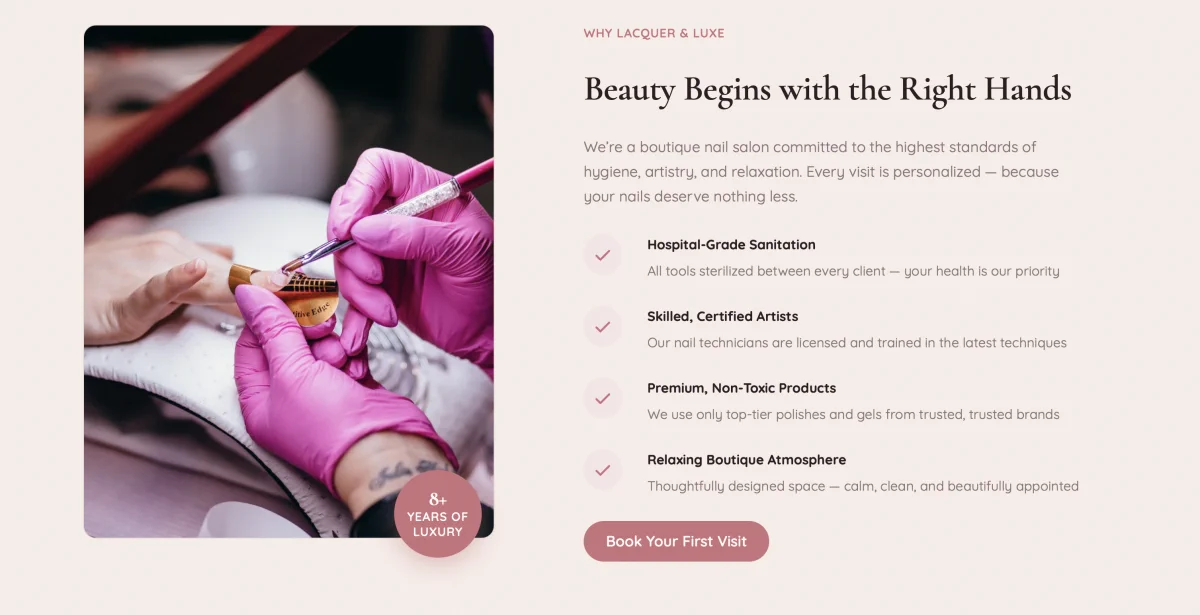
Image Rendering Fixes
Dropping an image into the pattern exposed a rendering issue: the image was overflowing the group’s border-radius rather than being clipped to it. The fix landed in style.css as targeted rules on the .overlay-grid-wrap class the image column uses:
overflow: hiddenon the first child when it contains awp-block-image— clips the image to the group’s rounded bordermargin: 0reset on the.wp-block-imageinside — removes the default block spacing that was pushing the image away from the edgeswidth: 100%; height: 100%; object-fit: cover; display: blockon theimg— makes the photo fill the container fully without distortion
The image container’s layout type also changed from constrained to default, letting the image fill the column naturally rather than being centered inside a max-width wrapper. Explicit padding and blockGap were removed from the container group for the same reason.
Why This Matters for the Nail Salon Vertical
When someone evaluates a WordPress theme for a client project, the demo needs to look finished. A placeholder in a key section signals “this isn’t done yet” — even when every other pattern is polished. The Why Choose Us section is above the fold on most nail salon demos, which makes a placeholder image there especially damaging to first impressions.
With a real photo bundled, the pattern is immediately deployable. A nail salon client can see their future site the moment a developer inserts the pattern — and that makes it easier to get sign-off without a lengthy back-and-forth over sample content.
It also means the overlay badge — the “8+ Years of Luxury” floating element in the bottom-left of the image column — finally has something to sit against. The badge uses the is-style-nail-salon-years-badge block style and overlays the image via the overlay-grid-wrap CSS grid. Without a real image it was floating over white space. With the photo it anchors properly and adds the depth the design intended.
Replacing the Default Photo
The bundled image is a starting point, not a requirement. Replacing it in the block editor takes seconds: click the image, open the block toolbar, and swap it from the media library. The CSS rules applied to .overlay-grid-wrap work for any image — the new photo will clip to the border-radius and fill the column the same way the default does.
For client projects, the expectation is always that real salon photography replaces the CC0 default. The bundled image gives the layout visual fidelity during setup and gives clients a clear idea of the proportions and style to match when supplying their own photos.
See It on the Demo
The updated Why Choose Us pattern is live at demo.imagewize.com/nail-salon/. The full nail salon vertical — hero, services grid, stats bar, Why Choose Us, testimonials, booking CTA — is available there with the Nail Salon style variation active.
Elayne 3.9.1 is available via the standard theme update mechanism. If you’re already running 3.9.0, updating pulls in the new photo and the CSS fixes automatically.
Comments are closed for this post.