What Is Trellis WordPress Hosting? Bedrock, Trellis, and Sage Explained
If you’ve researched Trellis WordPress hosting, compared managed WordPress hosting plans, or gotten a quote from a WordPress agency, you may have run into “Bedrock” and “Trellis” mentioned with zero explanation of what they actually are. Search for either term and you’ll land on documentation written for developers who already know the answer, or on a competitor’s blog post explaining the concept without offering it as a service.
That’s the gap this post fills. Bedrock, Trellis, and Sage — together known as the Roots stack — are the tooling behind a specific way of building and hosting WordPress sites. None of it is exotic once you see what each piece does. Here’s what they are, how they fit together, and when a Trellis-based host is actually the right call over Kinsta, WP Engine, or a generic managed host.
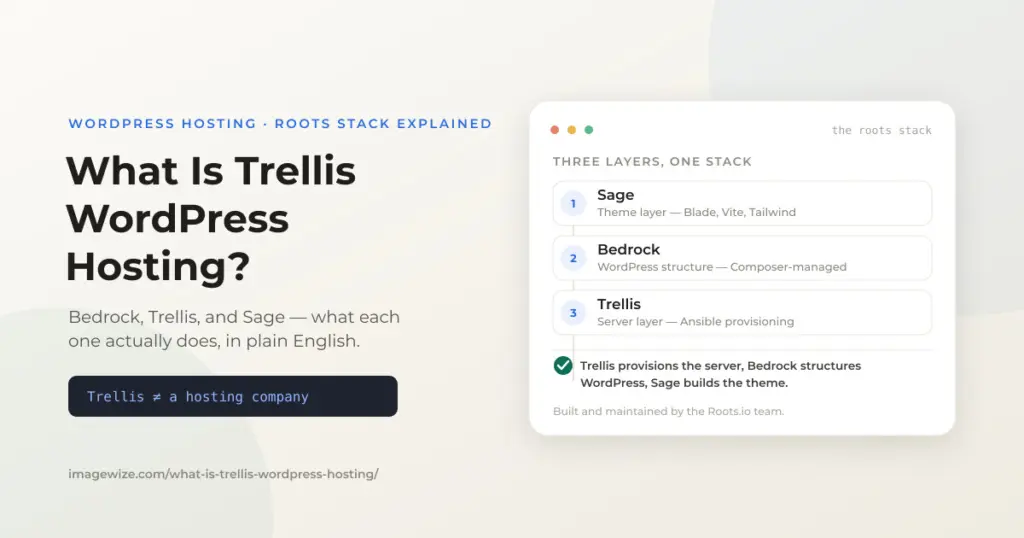
Quick Summary: Bedrock restructures WordPress’s file layout and dependency management using Composer. Trellis is an Ansible-based tool that provisions and configures the server WordPress runs on — it is not itself a hosting company. Sage is the theming layer, built on Laravel Blade and modern build tools. Together they’re called the Roots stack. It’s not “hosting” in the sign-up-and-go sense; it’s the infrastructure recipe behind hosting that’s reproducible, developer-controlled, and free of the shared-tenancy tradeoffs of platforms like Kinsta or WP Engine.
What Is Bedrock?
Bedrock is a WordPress boilerplate — a starting file structure and toolchain, not a plugin or a fork of WordPress itself. A standard WordPress install puts everything in one folder: core files, plugins, themes, and uploads all mixed together, updated by clicking buttons in wp-admin. Bedrock separates WordPress core into its own directory, moves the public web root to a dedicated web/ folder, and manages plugins and themes as Composer dependencies — the same package-management approach used across modern PHP development.
Practically, that means plugin versions are locked in a composer.lock file instead of drifting silently, environment-specific config (database credentials, API keys, debug settings) lives in a .env file that never gets committed to version control, and a site can be rebuilt identically on a new server just by running composer install. For a one-off brochure site this is overkill. For a site an agency maintains long-term, or one that gets deployed across staging and production environments, it removes an entire category of “which plugin version is actually live” problems.
What Is Trellis?
This is the part that causes the most confusion, so it’s worth being direct: Trellis is not a hosting company. It’s an open-source, Ansible-based tool that provisions and configures a server — Nginx, PHP-FPM, MariaDB, Redis, SSL, firewall rules, deployment scripts — from a plain Ubuntu box into a production-ready WordPress environment. You point Trellis at a server (Hetzner, DigitalOcean, Vultr, or any provider that gives you root access), run a provisioning playbook, and it builds the entire stack in a way that’s identical every time and version-controlled in a git repo. For what that stack does to speed, and which settings are Roots defaults and which are ours, see our WordPress speed optimization guide.
That’s why searching “Trellis hosting” gets confusing results: there’s no Trellis dashboard to sign up for, because Trellis is the tooling, not the destination. Someone still has to own the server, run the provisioning, and handle updates and monitoring — that’s either you, if you’re a developer comfortable with Ansible and server administration, or a company that offers Trellis-based hosting as a managed service (the model we use for managed WordPress hosting and for agencies via Roots stack development).
How Sage Fits In
Sage is the third piece — the theme framework, built with Laravel’s Blade templating engine, Vite for asset bundling, and Tailwind CSS by default. It’s not required to run Bedrock or Trellis; you can run any standard WordPress theme on a Trellis-provisioned server. But the three are commonly used together because they solve related problems the same way: modern tooling, dependency management instead of manual file edits, and a workflow that’s reproducible across a developer’s laptop, a staging server, and production. We’ve written separately about what that local development loop actually looks like day to day in FSE theme development in Trellis and Bedrock, and about a real migration in our Sage 10 to 11 upgrade.
Trellis-Based Hosting vs. Kinsta, WP Engine, and Similar Platforms
Kinsta, WP Engine, Cloudways, and similar platforms are managed hosting in the traditional sense: you pick a plan, they run the infrastructure, and you get a dashboard. That’s a real advantage for sites that just need WordPress to work without anyone thinking about servers. A Trellis-based host trades some of that hands-off simplicity for control, transparency, and — depending on the provider — dedicated rather than shared resources.
| Dimension | Kinsta / WP Engine (typical) | Trellis-based hosting |
|---|---|---|
| Infrastructure | Shared cloud platform (Google Cloud / AWS), tiers gated by resource limits | Dedicated VPS you control (Hetzner, DigitalOcean, Vultr) |
| Stack | Proprietary, generic WordPress — no Bedrock/Composer support | Trellis-provisioned Nginx, PHP-FPM, MariaDB, Redis — Bedrock-native |
| Server access | No SSH/root access on most plans | Full SSH access; you or your host can inspect and tune anything |
| Support | Ticket-based, often first-line screening before reaching an engineer | Direct access to whoever provisioned and manages the server |
| Pricing model | Tiered monthly plans, often gated by visit count or site count | Flat server cost or managed-hosting rate; no visit-count penalties |
Neither approach is universally better — they’re built for different priorities. The honest tradeoff: a Trellis-based host asks more of the provider (or of you, if self-managed) up front, in exchange for a stack that isn’t rate-limited by a dashboard and doesn’t lock you into one company’s infrastructure decisions.
Who Trellis-Based Hosting Is For — and Who It Isn’t
It’s a strong fit for WooCommerce stores that need dedicated resources rather than shared tenancy during traffic spikes, agencies managing multiple client sites who want one reproducible stack instead of learning each host’s quirks, and businesses that have been burned by a “noisy neighbor” slowdown on shared managed hosting. It’s a poor fit for someone who wants to install WordPress, pick a page builder, and never think about the server again — that’s exactly what Kinsta, WP Engine, and similar platforms are built for, and there’s no shame in wanting that.
How Imagewize Uses the Roots Stack
We provision every managed hosting client on Trellis — Hetzner in the EU, DigitalOcean or Vultr for US and Australian clients — and keep servers current ourselves rather than leaving that to an automated panel; see how we handle Trellis server updates for what that looks like in practice. For SMEs that just want reliable, fast WordPress hosting without needing to know any of the above, that’s managed WordPress hosting, from €49/month. For agencies that want a Roots stack partner — Bedrock, Trellis, and Sage development, white-label or direct — that’s Roots stack development.
Credit Where It’s Due: Roots.io
Trellis, Bedrock, and Sage aren’t ours. They’re built and maintained by the team at Roots.io as free, open-source projects, for well over a decade. Everything in this post — everything we sell as managed hosting and Roots stack development — runs on infrastructure someone else built and keeps maintaining for free. We’ve sponsored Roots’ open-source work in the past, and plan to again.
We try to put something back into the ecosystem too. sage-native-block is a free Composer package we maintain that scaffolds native Gutenberg blocks inside a Sage theme, published on Packagist and GitHub for any Sage developer to use. And Nynaeve, the Sage 11 theme running imagewize.com itself, is MIT-licensed and public on GitHub — 25+ custom blocks anyone can build on.
Frequently Asked Questions
- Is Trellis a hosting company? No. Trellis is an open-source, Ansible-based provisioning tool. It configures a server on infrastructure you (or your host) already control — Hetzner, DigitalOcean, Vultr, or similar — it doesn’t sell hosting itself.
- What’s the difference between Trellis and Bedrock? Trellis configures the server (Nginx, PHP-FPM, database, caching, deployment). Bedrock restructures the WordPress install itself (folder layout, Composer-managed plugins, environment config). They’re commonly used together but solve different problems.
- Do I need Sage to use Trellis or Bedrock? No. Sage is the theming layer and is independent of the other two — you can run any standard WordPress theme on a Trellis-provisioned, Bedrock-structured site.
- Is Trellis-based hosting more expensive than Kinsta or WP Engine? It depends on the provider and plan. A dedicated Hetzner VPS run through Trellis often costs less than the equivalent tier on a shared cloud platform, though pricing models aren’t directly comparable — Trellis-based hosting typically isn’t gated by visit count the way Kinsta and WP Engine plans are.
- Can I switch from Kinsta or WP Engine to a Trellis-based host? Yes. Migration involves moving the database and files and, if adopting Bedrock, restructuring the install to match its folder layout — this is typically handled as part of onboarding by a Trellis-based host or developer.
- Does Imagewize maintain any open-source Roots stack tools? Yes. sage-native-block is a free Composer package for scaffolding native Gutenberg blocks in a Sage theme, published on Packagist and GitHub, and Nynaeve is a free, MIT-licensed Sage 11 theme — both public under imagewize.
Done Managing Your Own Server?
We offer managed WordPress hosting built on Trellis — Nginx, PHP 8.3, Redis, automated deployments via Ansible, and Bedrock structure on Hetzner EU. No shared hosting, no page builders, no surprises.
- Trellis + Bedrock on Hetzner EU (Frankfurt / Helsinki)
- Nginx + FastCGI caching + Redis object cache
- Automated deployments via Ansible, SSL via Let’s Encrypt
- From €49/month — or €65/hour for one-off server work