Who Owns Your Website? A 10-Minute Check of Your Domain, Hosting and Logins
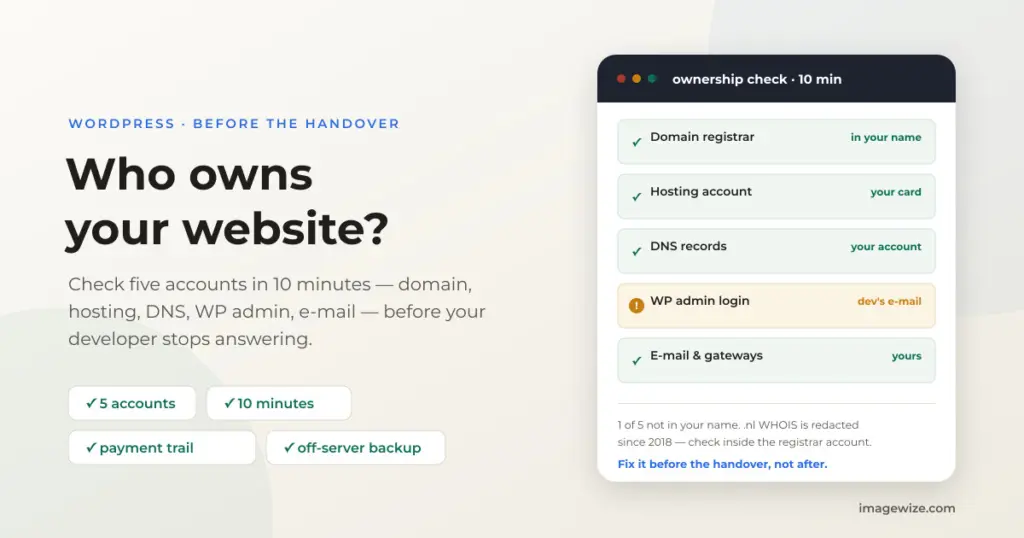
Your web developer stopped answering last week. The hosting invoice arrives in someone else’s inbox, the domain renewal notice goes to an address you don’t control, and the WordPress admin password that “should be in the handover document” turns out not to be. This is more common than you’d think — and the fix starts not with the developer, but with a ten-minute check of who actually controls the accounts underneath your site.
Here’s the uncomfortable truth: paying for a website does not mean you control it. Whoever controls the domain registrar account, the hosting panel and the WordPress admin login controls the site — they can point it elsewhere, take it offline, or simply not answer. Before you change developers, hire a rescue service, or send a lawyer’s letter, check these five accounts. It takes ten minutes and it tells you exactly where you stand.
Quick Summary: Five accounts decide who controls your website: the domain registrar, the hosting account, DNS, the WordPress admin login and the connected e-mail/Google accounts. Check each one in your own name, on your own card, with your own e-mail. If any of them sits in your developer’s name, a takeover is a paperwork exercise — invoices prove payment, registrars have transfer procedures, and hosts must export files and database. We’ve seen all of this in real takeovers: logins held under an agency’s password scheme, backups that lived only on the server they protected, and quotes that list hosting and domain as “supplied by the client” for exactly this reason.
The five accounts that decide who owns your site
A website is not one thing you own; it’s a stack of accounts, and each one has its own login, its own billing and its own owner. Check all five:
- Domain registrar — where the domain is registered (for .nl: a SIDN-accredited registrar such as your host or a registrar like TransIP). Whoever controls this can transfer the domain away.
- Hosting account — the server panel (cPanel, Plesk, or a VPS login). Whoever controls this controls the files, the database and the backups stored on the server.
- DNS — often a separate account (Cloudflare, registrar DNS, host DNS). Whoever controls DNS can point your domain anywhere without touching the site.
- WordPress admin — the wp-admin login, tied to an e-mail address. Check Users in the dashboard: every administrator account and its e-mail should be yours.
- E-mail and connected accounts — the mailbox the site sends from, Google Analytics/Search Console, payment gateway dashboards (Mollie, Stripe, PayPal). These are quietly the keys to the shop: password resets go to e-mail.
The 10-minute check
For each account, answer two questions: can I log in right now, and is the billing on my card, in my name, at my e-mail address. If you can’t log in, you don’t control it — you’re a guest.
- Domain: log in to the registrar account yourself. Don’t rely on public WHOIS — for .nl domains, registrant details have been redacted in public WHOIS by SIDN since 2018, so the only reliable check is inside the registrar account (or asking the registrar directly who the registrant is).
- Hosting: log in to the server panel and confirm you can see the site, take a backup and download it. Note where backups are stored — if they’re only on the same server, a server-level problem takes the backups down with it.
- DNS: find the NS records (see the developer note below) and confirm the DNS account is yours.
- WordPress: in wp-admin, open Users and check every administrator account and its e-mail. Remove or downgrade anyone who shouldn’t be there. Change the password and enable two-factor authentication on your account.
- Billing: search your inbox for invoices and receipts from the registrar, host and any SaaS the site uses (payment gateway, e-mail, forms). The payment trail is your proof of ownership if a dispute ever comes.
For the developers: checking registrar and DNS from the command line
Public WHOIS shows the registrar (and, outside .nl, often the registrant); DNS shows who controls the records:
whois example.nl | grep -i registrar
dig NS example.nl +short
dig +short example.nl
Inside WordPress, list administrator accounts and their e-mail addresses:
wp user list --role=administrator --fields=ID,user_login,user_emailRemember: redacted WHOIS (.nl since 2018) still shows the registrar — the registrant check belongs in the registrar’s own panel.
What we actually find in takeovers
We take over WordPress sites from other developers regularly, and the access problem is almost never the code — it’s the accounts around it. Three things from our own recent work:
- Logins held under an intermediary. A client came to us through an agency, and the site’s WordPress admin and hosting panel logins lived under the agency’s own credential scheme. When that password stopped working in October 2026, the access had to be restored by the agency itself — the client had no independent way in. Anyone in that position is one password change away from losing the site.
- Backups that only existed on the server they protected. When a returning client handed the site back to us after nine years, we deliberately held every update until hosting and FTP access arrived — there was no rollback path without it. The backup audit then found that the storage destination of the existing backups had never been confirmed; if they were local-only, a server failure would have taken the backups down with the site. The fix was one click in wp-admin, but the finding is the point: a backup you can’t download is not a backup.
- Quotes that start from access, not code. In our own takeover quotes, hosting, domain and e-mail are explicitly listed as “to be supplied by the client.” That’s not a formality: a takeover is only possible if you can get into the accounts, because the first step is always a verified backup on infrastructure you control. The nine-year case above is written up in full in our WooCommerce takeover case study.
If the accounts are in someone else’s name
If the check above shows the domain, hosting or admin login registered to your developer or agency, don’t panic — but don’t wait either. The usual order of operations:
- Gather the payment trail — invoices, card or bank statements, e-mails. Paid-in-full is the strongest proof that the site is yours.
- Request a transfer in writing — registrar transfer (auth/EPP code; for .nl the SIDN transfer procedure), hosting export of files + database, and a list of all admin accounts. A short, factual e-mail gets more done than a legal threat.
- Check your contract. Some agreements say the domain or custom code stays with the developer; others transfer on payment. “Proprietary” is a word to be skeptical of — read what it actually covers.
- Escalate if needed — the registrar has formal registrant-change procedures (in the EU, the registrar must cooperate for the legitimate registrant), and a lawyer’s letter citing the payment trail usually moves things. This is general information, not legal advice — procedures differ per TLD.
- Once you’re in: change every password (registrar, hosting, DNS, WordPress, e-mail, payment gateways), remove or downgrade old admin users, rotate database and salt keys, and take a backup you store off-server.
If you’re already in this situation and need a second pair of hands, that’s literally the work we do — see how a WordPress site takeover works and the on-call developer service for what happens after access is restored.
Hosting in your own name: a shared host or your own VPS
The hosting account is the one most often left in the developer’s name — and it decides where your files, database and backups physically live. For the next project, choose one of these two setups. Both keep the account and the invoice in your name; they differ in control and speed.
- Option 1 — a solid shared host, under your own name. Open the account yourself at a WordPress-specialized shared host; in the Netherlands that’s a provider like Antagonist, whose WordPress packages include SSH access. This suits most brochure sites, blogs and smaller shops: you hold the hosting panel on your own card, and you grant your developer a user login you can revoke at any time. We run clients exactly this way today — workcycles.com sits on Antagonist and the ecotuinteam.nl sites on Webreus, both accounts in the clients’ own names, with our access as a separate user.
- Option 2 — your own VPS, which we set up and run for you. For busier sites and WooCommerce shops, buy your own virtual server at Hetzner (Hetzner Cloud, EU-based) under your own account and give us access. We provision it with our Trellis/Bedrock stack — the same setup this site runs on — which is genuinely fast because each server is tuned for its site: Nginx, Redis, PHP 8.3 and server-level caching. We arrange the access the right way (your SSH key plus ours, no shared passwords) and set up regular automated backups to storage off the server, so a server failure never takes the backups down with it. Hetzner bills the server directly to you at cost — from about €6.50 a month for a small server — and if you want us to look after the site on it afterwards, management starts at €49 a month.
| Shared host in your name (e.g. Antagonist) | Your own Hetzner VPS | |
|---|---|---|
| Best for | Most SME sites, blogs, brochure sites | Busier sites, WooCommerce shops, higher traffic |
| Speed | Good, host-standard | Really fast — Trellis/Bedrock tuned per site |
| Account and billing | Your name and card at the host | Your name and card, billed by Hetzner at cost (from ~€6.50/mo) |
| Setup | The host’s standard package; developer gets user access | We provision and tune it; you own the server |
| Backups | Host backup plus an off-server copy | Regular automated off-server backups, set up and monitored by us |
Whichever you pick, one rule decides ownership: the hosting invoice arrives in your inbox, on your card, from the host itself. That invoice is your proof, and it’s what lets you move the site to another developer at any time without asking anyone’s permission.
Before the next developer starts: the prevention checklist
Whatever happens with your current developer, set up the next project so this never recurs:
- Register the domain yourself, at a registrar you log into yourself, on your own card.
- Open the hosting account in your name — a shared host like Antagonist or your own Hetzner VPS — and grant the developer access as a user, so that access you granted is access you can revoke. See hosting in your own name above for the two setups we recommend.
- Keep DNS where you control it, and keep the WordPress admin account on your e-mail, with 2FA.
- Store backups off-server (a second host or cloud storage), not only on the web server.
- Put a handover clause in the contract: on final payment, all accounts, credentials and files transfer to you, in writing.
Frequently Asked Questions
- Who legally owns my website? In most contracts you own the content and the database, and after payment the custom work or a broad licence transfers to you — but the domain registration belongs to whoever is the registrant, and practical control belongs to whoever holds the logins. Check your contract, and check the accounts; the two answers should match.
- Can a developer really register the domain in their own name? Yes — it happens, sometimes deliberately as leverage. For .nl domains the registrant is recorded at SIDN via the registrar, and public WHOIS has been redacted since 2018, which is why you check inside the registrar account instead.
- My developer won’t hand over access. What are my options? Start with the payment trail (invoices, card statements), then a written transfer request to the registrar and host — registrars have formal procedures and must cooperate for the legitimate registrant. If that stalls, a lawyer’s letter citing the payments usually works; this is general information, not legal advice.
- Is public WHOIS enough to check who owns my domain? Sometimes — outside the Netherlands it often shows the registrant. For .nl it hasn’t since 2018 (SIDN redaction), so log in to your registrar and check there; the registrar can also confirm the registrant by e-mail.
- What should be in my name before a new developer starts? The domain registrar account, the hosting account, DNS, the WordPress admin login (on your e-mail, with 2FA), the billing for all of them, and off-server backups — plus a contract clause that everything transfers to you on final payment.
Stuck Without Access to Your Own Site?
We take over WordPress and WooCommerce sites on any host — cPanel, Plesk or VPS — starting with a verified backup on infrastructure you control. Fixed quote before we start, €65/hour after, no retainer.
- Takeover of sites from a previous developer or agency
- Access recovery: domain, hosting, WordPress admin
- Verified off-server backups before anything changes
- On-call support afterwards, same developer