Building a Site-Wide Notification Bar for a WooCommerce Client with a WordPress Must-Use Plugin
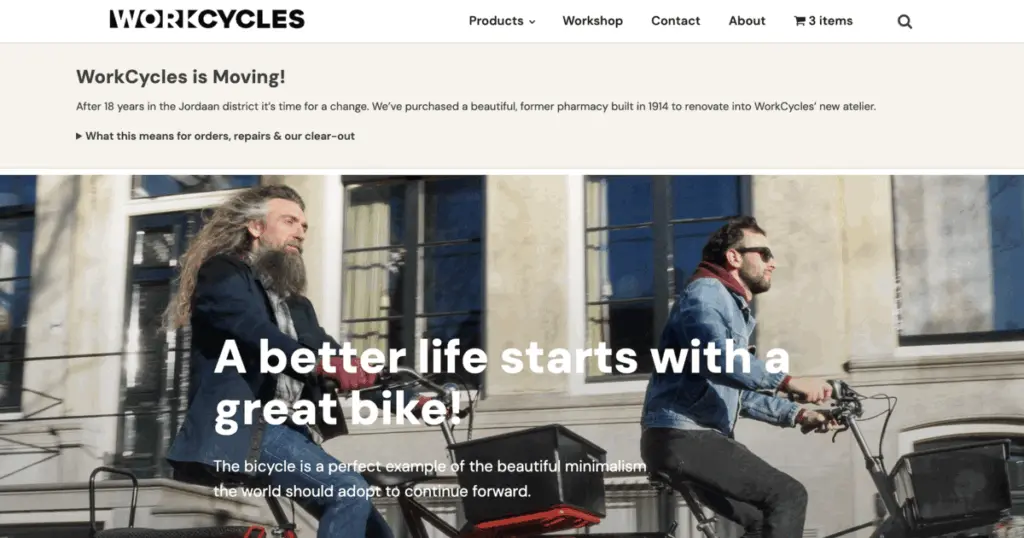
For one of my clients, WorkCycles.com, I had to add a notification bar to explain the move of the bricks-and-mortar shop to a new location. There are many ways you can do this on WorkCycles’ website. You can use the Oxygen Builder to add new sections on the pages where you want this bar. You can look for existing plugins that offer a bar or popup to show this. Or… you can roll your own.
I decided to add a must-use plugin to load the moving notification on the pages needed, below the menu but above all other content, so it would be clear to all visitors. We also needed to add a notification to the order emails so customers would be notified there when ordering bikes or spare parts. So there were two things to take care of.
Quick Summary: A single must-use plugin drives a site-wide moving notice on three WooCommerce pages, matched by page slug rather than ID because the two environments don’t agree on which ID is the contact page, then injected via output buffering into the Oxygen builder’s content wrapper. A shared constant then lets the same notice reuse itself in the order-received email, so pulling the notice down in November is one file deletion in one place, not a hunt through two.
Notification Bar MU Plugin
A must-use plugin is a slightly unusual corner of WordPress. Anything dropped into wp-content/mu-plugins loads automatically on every request and never appears in the normal plugin list, so nobody can switch it off by accident while clicking around the admin. For a temporary, site-wide announcement that has to be reliably on until it is deliberately off, that is exactly the behaviour I wanted: one file to add, one file to delete, and nothing left scattered through the theme.
To work with a plugin like this you need to add it to wp-content/mu-plugins, and the first part of it is the plugin header. Most of that header is bookkeeping (name, description, version), but two of the comment lines are there for whoever opens the file next: one saying the plugin is temporary and due to come out around November 2026, and one recording that the wording came from Henry himself and shouldn’t be rewritten without asking him.
For the developers: the plugin header
<?php
/**
 * Plugin Name: WorkCycles Moving Notice
 * Description: Site-wide announcement about the move to the new atelier. Shown on selected pages and in the customer order-received email.
 * Version:     1.0.0
 * Author:      Imagewize
 *
 * TEMPORARY — remove this file (or set WORKCYCLES_MOVING_NOTICE_ACTIVE to false)
 * once the move is complete and shipping/repairs have resumed. Target: November 2026.
 *
 * Copy supplied by Henry Cutler, 1 September 2026. Do not reword without asking him.
 *
 * @package WorkCycles
 */

defined( 'ABSPATH' ) || exit;
So we added the plugin name, description, version, author details, and package name, plus a blocker for direct access. We also added a switch to turn the bar on or off with a one-line change. That switch does more work than it looks like it does. Changing one value to false takes the notice off every page at once, without deleting the file or editing a single page. That matters when the move slips by a week, or when the shop wants the banner down for a day.
For the developers: the master switch
/**
 * Master switch. Set to false to hide the notice everywhere without deleting the file.
 */
define( 'WORKCYCLES_MOVING_NOTICE_ACTIVE', true );
Next is an array that decides which pages the notification bar loads on. This is where the first real trap turned up. The obvious way to list pages is by their ID number, but the IDs don’t match between the test copy of the site and the live one: the contact page is ID 2 on production and ID 198 on the sandbox, and there is no ID 2 on the sandbox at all, a leftover from an earlier cleanup that reslugged a different page in each environment. A list built on the test site would therefore have silently skipped the contact page on the live site, with nothing on screen to say anything was missing. Page slugs, the readable part of the URL, are identical in both, so matching on those makes the file portable between the two. I caught this on deploy rather than by reasoning about it, which is the honest version of events.
For the developers: the page-slug list
/**
 * Page slugs the notice appears on.
 *
 * ⚠️ Slugs, deliberately — NOT page IDs. The sandbox and production disagree on
 * which ID holds the contact page: production serves /contact/ from ID 2, while
 * the sandbox serves it from ID 198 and has no ID 2 at all. (The Aug 12 duplicate
 * fix reslugged a different page in each environment.) An ID list built on the
 * sandbox therefore silently skips the contact page on production, with nothing
 * to notice — caught on deploy, 2 Sep 2026. The slugs are identical in both, so
 * match on those and the file is portable.
 *
 * `is_page()` accepts slugs, and returns true for a static front page too, so
 * 'workcycles' (Home) needs no special casing.
 *
 * Henry (11 Aug): "overal waar klanten contact gaan verwachten".
 * The two appointment pages are listed but commented out pending his confirmation.
 */
function workcycles_moving_notice_page_slugs() {
	return array(
		'workcycles', // Home.
		'workshop',
		'contact',
		// 'workshopappointment',
		// 'showroom-appointment',
	);
}
Then we have some checks to decide whether or not to load the bar. If the notification is switched off, if we’re on an admin page or doing AJAX, or if it’s a feed or a 404, the bar won’t display. One more exclusion had to be added after the fact: the bar must never render inside the Oxygen page builder itself. The builder’s templates don’t guarantee the wrapper element the notice injects into, so rather than landing in place it dumped raw, unstyled notice HTML above the editing interface. That one surfaced from a screenshot of the live site, not from testing.
For the developers: the render guards
/**
 * Should the notice render on the current request?
 *
 * @return bool
 */
function workcycles_moving_notice_should_show() {
	if ( ! WORKCYCLES_MOVING_NOTICE_ACTIVE ) {
		return false;
	}

	if ( is_admin() || wp_doing_ajax() || is_feed() || is_404() ) {
		return false;
	}

	// Never render inside the Oxygen builder (parent shell or content iframe,
	// both carry ct_builder in the query string). The builder's templates
	// don't guarantee a `.ct-inner-content` wrapper to inject into, so the
	// fallback path prepends raw, unstyled notice HTML above the builder UI —
	// found via a production screenshot, 2 Sep 2026.
	if ( isset( $_GET['ct_builder'] ) ) { // phpcs:ignore WordPress.Security.NonceVerification.Recommended
		return false;
	}

	return is_page( workcycles_moving_notice_page_slugs() );
}
Then we get to the actual HTML markup for the bar, built using output buffering. Output buffering means catching the finished page just before WordPress sends it to the browser, holding it in memory, and editing it on the way out. It is a blunt instrument and not where you would normally start. But a page builder like Oxygen owns the layout, and it offers no tidy hook for slipping something in between the menu and the content. Intercepting the assembled page and inserting the bar at the right point is the option that actually works.
For the developers: the notice markup
/**
* The notice markup.
*
* @return string
*/
function workcycles_moving_notice_markup() {
$contact_url = home_url( '/contact/' );
ob_start();
?>
<div class="wc-moving-notice" role="region" aria-label="WorkCycles is moving">
<div class="wc-moving-notice__inner">
<h2 class="wc-moving-notice__title">WorkCycles is Moving!</h2>
<p>After 18 years in the Jordaan district it’s time for a change. We’ve
purchased a beautiful, former pharmacy built in 1914 to renovate into WorkCycles’
new atelier.</p>
<details class="wc-moving-notice__more">
<summary>What this means for orders, repairs & our clear-out</summary>
<div class="wc-moving-notice__more-body">
<p>We’ll continue shipping parts and bike orders until <strong>mid
September</strong>. Then we’ll pack everything up. We’re happy to
receive new orders after that but shipping will be delayed until
<strong>roughly November</strong>. Bicycle repairs and service will also
resume in November.</p>
<p>We’re using the opportunity to “lighten the load”. Most of
the showroom bikes have been sold but we do have some cool, bulky items
we’d rather sell than move: antique transport bikes, redundant workshop
fixtures (lifts, truing stands…), furniture etc. Interested?
<a href="<?php echo esc_url( $contact_url ); ?>">Contact me</a>.</p>
</div>
</details>
</div>
</div>
<?php
return trim( ob_get_clean() );
}Followed by the inline styling for it all. The styles sit inside the plugin rather than in the theme’s stylesheet, for the same reason as everything else here: when the file goes, the styling goes with it. Nothing is left behind in a theme file for someone to find next year and wonder about.
For the developers: the inline styles
/**
 * Inline styles for the notice.
 *
 * @return string
 */
function workcycles_moving_notice_styles() {
	return '
	.wc-moving-notice {
		background: #f7f3ec;
		border-top: 1px solid #e2d9c9;
		border-bottom: 1px solid #e2d9c9;
		border-left: 5px solid #c8a44d;
		padding: 28px 24px;
		margin: 0 0 8px;
	}
	.wc-moving-notice__inner {
		max-width: 1120px;
		margin: 0 auto;
	}
	.wc-moving-notice__title {
		margin: 0 0 12px;
		font-size: 24px;
		line-height: 1.25;
		letter-spacing: 0.01em;
	}
	.wc-moving-notice p {
		margin: 0 0 14px;
		font-size: 14px;
		line-height: 1.6;
	}
	.wc-moving-notice p:last-child { margin-bottom: 0; }
	.wc-moving-notice a { text-decoration: underline; }

	/* Collapsed at every width — Henry, 2 Sep 2026: "Misschien dezelfde inklappen
	   versie op de home pagina?" Only the first paragraph shows until opened. */
	.wc-moving-notice__more { margin: 0; }
	.wc-moving-notice__more > summary {
		cursor: pointer;
		font-size: 14px;
		font-weight: 600;
		line-height: 1.5;
		padding: 2px 0;
		list-style: revert;
	}
	.wc-moving-notice__more > summary:focus-visible {
		outline: 2px solid #c8a44d;
		outline-offset: 3px;
	}
	.wc-moving-notice__more[open] > summary { margin-bottom: 12px; }
	.wc-moving-notice__more-body > p:last-child { margin-bottom: 0; }

	@media (max-width: 782px) {
		.wc-moving-notice { padding: 20px 16px; }
		.wc-moving-notice__title { font-size: 20px; }
	}
	';
}
Finally, the part where we load it all inside the Oxygen content block. The wp_body_open hook fires before Oxygen has loaded any of its content, right after the <body> tag.
For the developers: hooking into wp_body_open
/**
 * Start buffering the page body so the notice can be placed inside Oxygen's
 * content wrapper rather than above the (sticky, overlay) header.
 */
add_action(
	'wp_body_open',
	function () {
		if ( ! workcycles_moving_notice_should_show() ) {
			return;
		}

		printf( "<style id=\"wc-moving-notice-css\">%s</style>\n", workcycles_moving_notice_styles() );
		ob_start();
	},
	0
);
And then one part to flush the buffer and load it right after Oxygen’s inner content opening tag. We use ob_get_level() to check the output buffering level, and bail early if there isn’t one. If something else on the site has already closed the buffer, doing nothing is the right outcome: a missing banner is a much smaller problem than a mangled page.
For the developers: injecting into Oxygen’s wrapper
/**
 * Flush the buffer, injecting the notice directly after Oxygen's
 * `.ct-inner-content` opening tag. Falls back to prepending the buffer
 * if that wrapper is not found, so the notice is never silently lost.
 */
add_action(
	'wp_footer',
	function () {
		if ( ! workcycles_moving_notice_should_show() ) {
			return;
		}

		if ( ! ob_get_level() ) {
			return;
		}

		$html   = ob_get_clean();
		$notice = workcycles_moving_notice_markup();

		$injected = preg_replace(
			'#(<div[^>]*class=([\'"])[^\'"]*\bct-inner-content\b[^\'"]*\2[^>]*>)#i',
			'$1' . str_replace( '\\', '\\\\', $notice ),
			$html,
			1,
			$count
		);

		if ( null !== $injected && $count > 0 ) {
			echo $injected; // phpcs:ignore WordPress.Security.EscapeOutput.OutputNotEscaped
			return;
		}

		echo $notice . $html; // phpcs:ignore WordPress.Security.EscapeOutput.OutputNotEscaped
	},
	-999
);
ob_get_clean() gets the contents of the active output buffer, turns it off, and returns it as a string we can then work with. We run preg_replace() over that string to find the right tag to inject our markup after.
Reusing the Notice in the Order-Received Email
WorkCycles already had a second must-use plugin, built a few weeks earlier: a custom WooCommerce email class that acknowledges an order the moment it comes in. WooCommerce never actually takes payment on this site, because Henry confirms every order by hand from his own ERP. The stock “on-hold” email’s hardcoded “until we confirm that payment has been received” line was therefore never true, and all four of WooCommerce’s built-in customer emails stay switched off. A separate email class sidesteps that wording entirely and still shows up in WooCommerce → Settings → Emails, so Henry can edit the subject and heading himself.
A few days after the notice went live on the site, Henry asked whether customers placing an order should see it too: “Wellicht moeten klanten die toch een bestelling plaatsen ook zo’n bericht krijgen” (maybe customers who do place an order should get that message as well). That ruled out just dropping the same markup into the email. Someone who has already ordered doesn’t need the clear-out paragraph aimed at browsers (“antique transport bikes, redundant workshop fixtures…”); they need the two facts that actually affect their order: when it ships and when repairs resume. So the email gets its own, shorter version.
For the developers: the shortened email notice
/**
 * The moving notice, shortened for an order acknowledgement.
 *
 * Deliberately gated on the SAME constant as the on-site notice in
 * workcycles-moving-notice.php, which loads first (mu-plugins load
 * alphabetically, and "moving" sorts before "order"). Deleting that
 * file in November therefore drops this from the email too — one
 * removal, both places. The defined() guard means its absence is
 * harmless rather than fatal.
 *
 * @return array Paragraphs, or an empty array when the notice is off.
 */
protected function get_moving_notice() {

	if ( ! defined( 'WORKCYCLES_MOVING_NOTICE_ACTIVE' ) || ! WORKCYCLES_MOVING_NOTICE_ACTIVE ) {
		return array();
	}

	return array(
		'WorkCycles is moving. After 18 years in the Jordaan district we have purchased a beautiful, former pharmacy built in 1914 to renovate into WorkCycles\' new atelier.',
		'We will continue shipping parts and bike orders until mid September. Then we will pack everything up. Shipping will be delayed until roughly November, and bicycle repairs and service will also resume in November.',
	);
}
Reusing the same constant, rather than adding a second one, is the whole point: whoever deletes the notice plugin in November also removes it from the order email, without needing to remember there were two places carrying the copy. Wiring in the constant costs one defined() guard, and its absence is harmless rather than fatal. If the moving-notice plugin is ever removed first, this file simply stops rendering anything.
The HTML body renders it as a table rather than a styled <div>, because Outlook’s Word rendering engine handles divs unreliably in email.
For the developers: the email table markup
<?php
$moving = $this->get_moving_notice();
if ( $moving ) :
	$last = count( $moving ) - 1;
	?>
	<table border="0" cellpadding="0" cellspacing="0" width="100%" style="margin:0 0 18px;border-collapse:collapse;">
		<tr>
			<td style="background-color:#f7f3ec;border-left:4px solid #c8a44d;padding:16px 18px;font-family:Helvetica,Arial,sans-serif;font-size:14px;line-height:1.6;color:#333333;">
				<strong style="display:block;margin:0 0 8px;font-size:15px;">WorkCycles is Moving!</strong>
				<?php foreach ( $moving as $i => $para ) : ?>
					<p style="margin:0 0 <?php echo ( $i === $last ) ? '0' : '10px'; ?>;font-size:14px;line-height:1.6;color:#333333;">
						<?php echo esc_html( $para ); ?>
					</p>
				<?php endforeach; ?>
			</td>
		</tr>
	</table>
<?php endif; ?>
The plain-text version prints the same two paragraphs under a plain uppercase heading instead of styled markup. Building that version surfaced a bug worth flagging: the rest of the plain-text body is assembled with esc_html() calls, which is correct for HTML but wrong for a text/plain email. It leaves entities un-decoded, so a customer reads isn't instead of isn't. The fix is a single html_entity_decode() call around the whole buffered string right before it’s returned, rather than unpicking the escaping on every individual line.
For the developers: the plain-text entity fix
// esc_html() is right for the HTML body but wrong for a text/plain
// one: it leaks entities, so the customer reads "isn't" rather
// than "isn't". Decoding once here fixes every line above without
// unpicking the escaping WPCS expects on each echo. Harmless for
// the order-detail templates too, which are already plain text.
return html_entity_decode( ob_get_clean(), ENT_QUOTES, 'UTF-8' );
Two mu-plugins, one shared constant, and a rendering path each notice needed to speak fluently: an HTML wrapper that survives Oxygen’s builder, and a plain-text one that survives Outlook. When the move is done, deleting the notice plugin removes the banner from the site and the paragraph from the email in a single step, which was the actual point of tying them together this way.
Done Managing Your Own Server?
We offer managed WordPress hosting built on Trellis — Nginx, PHP 8.3, Redis, automated deployments via Ansible, and Bedrock structure on Hetzner EU. No shared hosting, no page builders, no surprises.
- Trellis + Bedrock on Hetzner EU (Frankfurt / Helsinki)
- Nginx + FastCGI caching + Redis object cache
- Automated deployments via Ansible, SSL via Let’s Encrypt
- From €49/month — or €65/hour for one-off server work