How I Write Blog Posts With AI, and What I Still Decide Myself
Most AI-written blog posts read the same: generic, confident and slightly wrong. I use AI for every post on this site anyway. The difference is in what I let it do, and what I keep for myself.
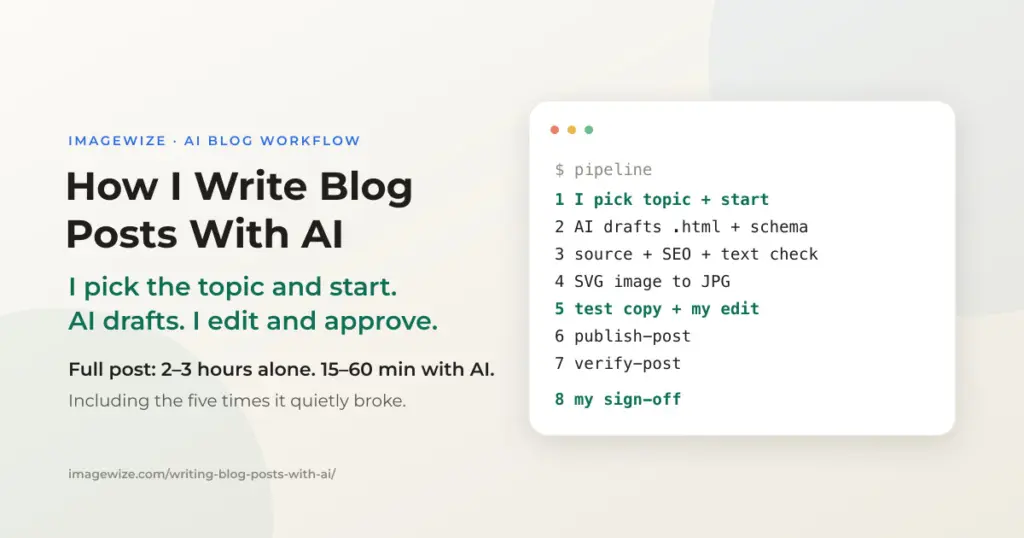
I run Imagewize on my own, as a freelance WordPress developer. On my own, a full blog post took me two to three hours. Only a short note of two or three paragraphs was done in about 30 minutes. With Claude, an AI assistant, a full post now takes 15 minutes to an hour, including the rounds of edits after I read the draft, and the posts are longer and pass more SEO checks than before. This one took about an hour. But writing was never the slow part. Checking that a post is true, readable, findable and safe to publish is where the time goes, and that is where I put the effort. Here is the process, including the five times it quietly broke.
Quick Summary: Every post starts with me: something I built, an opening I wrote, or a news story I picked from a list Claude suggested. Claude writes the full draft from that start, checks it for SEO and structured data, and makes the featured image. I read the post on a private test copy of my site and ask for changes until it is right. Nothing goes live without my yes, and after publishing an automatic check confirms the live page matches the draft.
How I write a blog post with AI, step by step
Every post follows the same nine steps. The order matters, because each step catches a different kind of mistake.
- I pick the topic. Topics reach me in three ways. I built or fixed something for a client or for my own site, and I want it written up. I have an idea and write the first one or two paragraphs myself. Or I ask Claude for the latest e-commerce news: it suggests topics that fit my clients and the posts I already have, and I cut that list down to one, or to none. A topic with no real work or source behind it does not get written. Before drafting, Claude also checks who already ranks in Google for the topic. If large platforms own that search, I pick a narrower angle or drop the topic. I added that check after publishing this post: it showed the search title I had chosen could not win, so I changed it. A second check came later, in October 2026: before drafting, Claude must find something only I have, such as a test I ran, something that broke or a number from my own data. If it finds nothing, I run a small test first, write a shorter post or skip the topic. I added it after an audit of my last 20 posts found that only one carried that kind of detail.
- Claude writes the first draft from my start. It expands my opening, my notes on the work, or the news story I picked into a full post. It also adds what readers and search engines look for: a short summary at the top, a FAQ, and structured data that tells Google and AI tools what the page is about.
- The facts get checked against the source. Claude checks every outside claim against the original text, such as the law itself or the official documentation, not against its own memory. I decide what is solid enough to publish under my name. What cannot be verified is left out or flagged in the post.
- Code goes out of the way. A shop owner should not hit a wall of code. Technical details go into collapsed "For the developers" sections, so the story reads cleanly and a developer can still open the proof.
- Three checks run on the draft. Each is a Claude Skill: a saved set of instructions that Claude follows the same way every time. An SEO check that I built myself (title, description, headings, links, and since October a block on posts that have no first-hand proof), a structured-data check (the FAQ data matches the FAQ on the page) and a clean-up pass that removes stray hidden characters that break copy-paste and search, and checks the featured image for hidden AI metadata. The last two started as open source skills.
- Claude makes the featured image, and I check it. That is the picture that shows when the post is shared on LinkedIn or in a chat app. Often the first version is fine. When it is not, I say what to change and it gets redone.
- I read it on a test copy of my site. The post goes onto a private copy of imagewize.com first. I read it in a browser as a reader would, on desktop and phone, and ask Claude for changes until it is right. This is the editor’s job, and it is mine.
- I say yes, or not yet. Often the answer is not yet, and the post goes back for another round of edits. Only after my yes does it go to the live site. An automatic check then compares the live page with the draft, so nothing went missing on the way.
- Follow up. I link to the new post from older related posts, such as my guides to what AI engines read on your site and the WooCommerce AI readiness audit, and write a LinkedIn version that tells the same story.
What AI does, and what I decide
AI is fast at structure and consistency and unreliable about facts and judgment. So I split the work along that line.
| Claude does | I decide |
|---|---|
| Suggests e-commerce news topics that fit my clients and my existing posts | Which topic to write, or none, and who it is for |
| Expands my opening, my build notes or the news story into a full draft with summary, FAQ and structured data | The starting point: on some posts I write the first paragraphs myself |
| Researches when asked, checks sources, and lists what it could not verify | Whether a claim is true enough to publish under my name |
| Runs the SEO and structured-data checks and fixes what they flag | Whether the advice is something I would give a paying client |
| Makes the featured image, and redoes it when I ask | Whether the image says the right thing, and what to change when it does not |
| Applies the edits I ask for on the test copy | What changes, after reading the post as the editor |
| Runs the publish and the live-page check | The go-ahead to put it on the live site |
The last row is deliberate. Publishing changes a site that clients and search engines see, so it needs my yes every time. It is never a step the process takes on its own.
Where it broke
Most of what makes this process safe, I learned by getting it wrong. Each failure below was silent: the post saved, no error appeared, and a normal read-through looked fine.
- The structured data disappeared. WordPress removes certain code from a post when the account saving it lacks permission. One post lost the data that tells Google what it is about, without any warning.
- The call to action saved empty. A short shortcut for the contact box at the bottom only works when a person adds it in the editor. Saved any other way, it became an empty box.
- Code samples lost characters. A post with code examples lost every backslash on save. The text read fine, so I only noticed when I checked the code on the live page.
- A copied post broke a box. Copying a post’s content out of the site and back in left the contact box in a state the editor no longer accepted, and I had to add it again by hand.
- A box missed one style. On Oct 11 the contact box at the bottom of a new post lacked one spacing setting. I caught it in a check after publishing.
None of these were AI mistakes. They were plumbing problems that appear when a post is saved by a tool instead of typed into the editor. Each time, I turned the lesson into an automatic check, so the same thing cannot slip through again.
What gets checked when Claude Code publishes to WordPress
Publishing runs through WP Ops, the publishing and ops tool I built for my WordPress sites. It is open source, with the code on GitHub. It stops obvious problems before anything is saved and compares the result with the draft afterwards. That turns the lessons above into a routine instead of a checklist in my head. The skills from step 5 judge the draft before it is saved. WP Ops checks what happened during the save. They overlap only on simple things like title length and links that work.
| Check | What it catches |
|---|---|
| Same address already in use | Publishing the same post twice, or an empty draft |
| Shortcut boxes | A contact box that would save empty |
| Saved post against the draft | Text changed or removed during the save |
| Structured data count | Data for Google removed by WordPress on save |
| Updates to a live post | An update that removes something the live post already had |
| Featured image link | A guessed image address that leads nowhere |
For the developers: the publish steps, as CLI commands
Drafting and checking happen in Claude Code. Each post is one .html file of WordPress block markup. WP Ops resolves the Trellis project from the working directory, writes the post content without passing a WP-CLI user (so <script> JSON-LD is not stripped by kses), and verifies the result. A dry run parses the header and runs the preflight without changing anything. The test copy is a local Trellis virtual machine. Images start as SVG, which is text: Claude can edit one label precisely, git shows what changed, and the JPG for WordPress and LinkedIn is just an export, so it stays out of version control.
The checks are Claude Skills, stored as plain files in my private SEO repository, so Claude Code loads them whenever it works there. Before drafting: serp-check (who already ranks, with its method adapted from aaron-marketing-skills) and first-hand-proof (my own: finds the test, failure or number that only I have, and refuses to invent one). On the draft: seo-audit (my own, and it blocks publishing when the draft has no PROOF line in its header), schema (adapted from marketingskills) and publish-hygiene (adapted from watermarks-remover; it strips invisible characters that slip in through copy-paste and checks images for hidden metadata, but it does not rewrite prose).
In practice Claude runs these steps through the WP Ops MCP server (publish_post, verify_post). The CLI commands below do the same by hand.
Edits to a live post take the same route: publish_post with the post ID, so every check runs again. Any other WP-CLI command goes through the MCP wp_cli tool, which runs read-only commands directly and refuses anything else until I confirm it.
# featured image: SVG source -> JPG for upload
wp-ops svg-to-jpg designs/featured-images/<slug>-featured.svg

# preflight only, no changes
wp-ops publish-post post.html imagewize.com local --dry-run

# local copy of the site, then production with the image attached
wp-ops publish-post post.html imagewize.com local --image featured.jpg
wp-ops publish-post post.html imagewize.com production --image featured.jpg

# stored vs rendered: JSON-LD, blocks, internal links
wp-ops verify-post <slug> imagewize.com production
For the developers: the draft header every post carries
The publish command reads these header comments to set the slug, titles, tags and category. The SEO Framework brand suffix is switched off per post with a post meta flag.
<!-- SUGGESTED POST SLUG: /slug/ -->
<!-- SUGGESTED TITLE: Full Descriptive Post Title -->
<!-- SUGGESTED META TITLE (max ~60 chars): Keyword-Led Title -->
<!-- SUGGESTED META (max 155 chars): Meta description. -->
<!-- SUGGESTED TAGS: tag1, tag2 -->
<!-- SUGGESTED CATEGORY: WordPress -->
A real example: the EU withdrawal button post
On Oct 11, 2026 I published a post on the new EU withdrawal button this way. It started as a news topic: I asked Claude for the latest e-commerce news, it came back with a short list of topics for my clients, and I picked this one. Since June 19, 2026, EU web shops must offer an easy way to withdraw from a purchase online, and WooCommerce 11.1 added a form for it.
- Sources: the claims were checked against the EU law text on EUR-Lex and the WooCommerce documentation. Country-specific rules and fines were left out on purpose, because I had not verified them.
- Honest gap: I did not know whether the WooCommerce 11.1 customer email shows the date and time of the withdrawal, so the post tells readers to test it themselves.
- After publishing: a second SEO check moved the main keyword into the first heading, fixed the date format in the search snippet and corrected the contact box.
- Links: two older, related posts now link to it, after a backup of the site.
- LinkedIn: a separate post told the same story in LinkedIn’s own format, ending on a real question.
That is the whole idea. AI makes the work cheap enough to do properly, and the checks make sure that doing it fast did not mean doing it carelessly.
Using AI for your own business blog
You do not need my tools to use the same rules. These four matter more than any software:
- Start from something real. A job you did, a question a customer asked, a change in your market. AI fills in structure well, but it cannot invent your experience.
- Check facts against the original source. Prices, laws, dates and product features are where AI is most often confidently wrong.
- Read it before it goes live. Read the whole post as a customer would, on your phone too. If it does not sound like you, change it.
- Keep the publish button yours. Let AI draft and check, but decide yourself what goes out under your name.
Google has said it rewards helpful content however it is made, and that content made mainly to manipulate rankings breaks its spam policies, whether a person or AI wrote it (Google Search Central). The rules above are how you stay on the right side of that line.
What this does not do
- It does not choose good topics on its own. Claude can list what happened in e-commerce this week, but picking what a store owner needs to know still takes judgment about clients and markets.
- It does not replace first-hand experience. The posts that work are the ones built on something I did, which is why every post starts from real work. In October 2026 I made that a rule the tools enforce: a draft without a first-hand detail does not pass the SEO check. I have not yet measured whether that changes rankings.
- It has not been proven to raise traffic. Search results and AI answers depend on many things, so I track reach and rankings separately (see my WordPress SEO work) instead of assuming a faster process means a better outcome.
Frequently Asked Questions
- Do you write blog posts with AI? Yes, with a clear split of work. I choose the topic and the starting point: something I built, an opening I wrote, or a news story I picked from Claude’s suggestions. Claude writes the draft from there and runs the checks. I check the facts, edit the post on a test copy of my site and approve the publish. Posts are built on real work or sourced news, not on made-up claims.
- Does Google penalize AI-written blog posts? Not for being AI-written. Google says it rewards helpful content however it is produced, and that content made mainly to manipulate search rankings breaks its spam policies whether a person or AI wrote it. What counts is whether the post is accurate and useful.
- How long does a blog post take with AI? For me, a full post takes 15 minutes to an hour, including my edit rounds. On my own that took two to three hours, and only a short note of a few paragraphs was done in about 30 minutes. A post about a news story or work I just finished can go live in under 15 minutes. A post I review closely takes about an hour. The posts are also longer than before. Writing got faster. Most of the time now goes into checking facts, reading the post and asking for changes before it goes live.
- Which tools do you use? Claude Code for drafting and checking, WP Ops, my own open source publishing and ops tool, to publish and verify each post, and a private test copy of my site where I read every post before it goes live.
- Can a small business use this approach? Yes. The tools matter less than the rules. Start from real experience, check facts against the original source, read the post before publishing, and keep the final decision with a person.
Need a WordPress Developer?
We build, maintain, and troubleshoot WordPress sites for SMEs — custom theme development, plugin configuration, hosting setup, and ongoing hosting and support. Fixed-price quotes available.
- Custom WordPress theme and plugin development
- WordPress hosting setup and server configuration
- Site migrations, updates, and troubleshooting
- Ongoing hosting, updates, and on-call support