The EU Legal Guarantee Notice on WooCommerce: What the Law Says and What We Tested
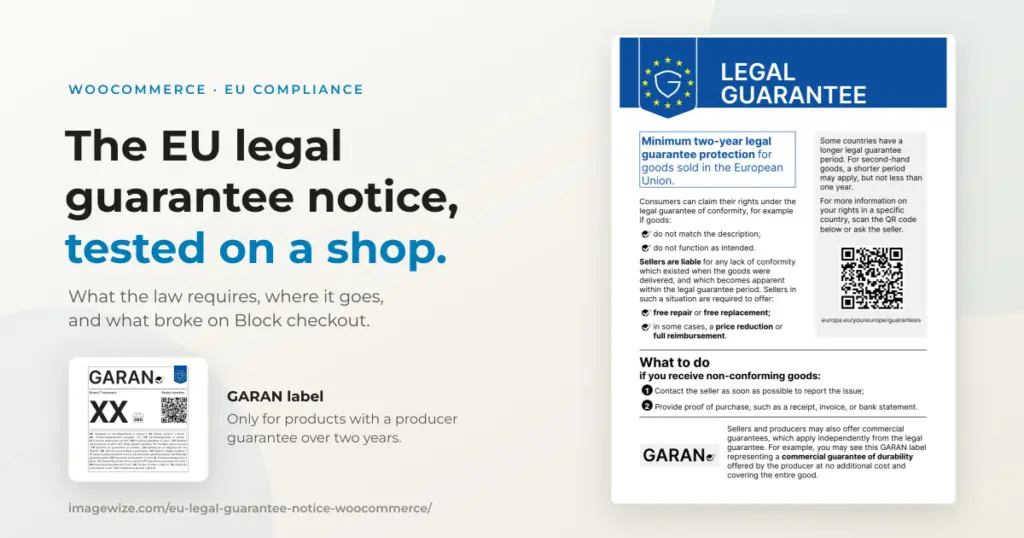
Since September 27, 2026, an online shop that sells to consumers in the EU has to remind its customers of their legal guarantee, using a notice the European Commission designed down to the colors. Most of what ranks for this is a plugin pitch. The law itself is shorter than the pitches suggest, and one part of it is stricter than the plugin pages say. I read the regulation and the directive behind it, then built the notice on a WooCommerce demo store with the Block checkout and compared it with two free plugins.
One finding changes the to-do list. The notice is a shop-wide reminder. The label for long producer guarantees is the one that has to appear next to the product and directly before the customer pays. Mixing those two up is the most common mistake in the advice I found. A second finding came from the build itself: on our block-theme demo store, both free plugins showed the notice at checkout and neither showed it on the product page, because they hook a classic WooCommerce action that the theme never fires.
Quick summary: Regulation (EU) 2025/1960 applies from September 27, 2026 and sets the design of two things: the harmonised notice on the legal guarantee (every shop) and the GARAN label for producer guarantees over two years (only products that have one). The notice is a general reminder, placed prominently on the site. GARAN must sit with the product and be shown directly before the order is placed. Neither can be edited, apart from the years, brand and model on the label. Free plugins exist, but on a block theme both showed nothing on the product page in my test.
In This Guide
- What the Law Requires: Two Different Things
- Does It Apply to Small Stores?
- Where Each One Goes
- What Enforcement Looks Like in Four Markets
- What bol.com Does
- What We Built and Measured
- Two Free Plugins, Same Store
- The GARAN Font Trap
- The Order Email
- A Practical Checklist
- Frequently Asked Questions
What the Law Requires: Two Different Things
Directive (EU) 2024/825 added Article 22a to the Consumer Rights Directive, and Commission Implementing Regulation (EU) 2025/1960 sets the design. The regulation has three articles. It does not say where to put anything. It only fixes what the two items look like, and that they apply from September 27, 2026.
| Harmonised notice | GARAN label | |
|---|---|---|
| What it is | A reminder that buyers have a legal guarantee of at least two years, with a QR code to the Your Europe portal | A label saying the producer gives a free guarantee on the whole product for more than two years |
| Who must show it | Every trader selling goods to EU consumers | Only for products where the producer offers such a guarantee and passes that on to you |
| Where | Prominently, as a general reminder on the website | Tied to the product, and directly before the customer places the order |
| Can you edit it | No element | Only the years, the brand and the model identifier |
The label rule is spelled out in the directive: for an online order with an obligation to pay, the trader must show the label information “directly before the consumer places his order” (Article 8(2), which lists Article 6(1) point (la)). The legal guarantee reminder, point (l), is not in that list. The recitals describe the notice online as “a general reminder on the website of the trader.” The Commission’s practical guidelines give three online examples: the catalogue page, the header and the checkout. A notice on every product page is not stated as a requirement for the notice.
This applies to goods. Your Europe describes it for consumer goods and says nothing about services. If you sell to consumers in the EU, it is aimed at you wherever you are based. The directive’s scope article only says it covers “any contract concluded between a trader and a consumer,” so check your own situation if you are outside the EU.
Does It Apply to Small Stores?
Yes, at any size. I found no minimum revenue, order count or staff number in the regulation, in the Consumer Rights Directive, or in the Commission’s guidelines. Article 3(1) of the directive applies to “any contract concluded between a trader and a consumer,” and the exclusions in Article 3(3) are about types of contract, not the size of the seller. A shop with ten orders a year has the same duty as one with ten thousand.
The thresholds many shop owners remember belong to other rules. The EU VAT threshold of 10,000 euros is in the VAT setup guide, and the accessibility rules have exemptions of their own in the European Accessibility Act guide. This notice has neither. The test is who you sell to and what you sell:
- In: any shop selling goods to consumers in the EU, including a small one, a side business and a shop based outside the EU.
- Probably out: a shop that sells only to businesses, because the notice is a reminder to consumers, and a shop that sells services or digital content only, since the notice is about goods.
- Check the platform: if you sell through a marketplace, find out what the platform already shows. bol’s partner pages say bol adds the notice to product pages itself, while the GARAN label stays the partner’s job.
“Probably” is deliberate. Where a shop sits on the line between consumer and business sales, or sells mixed goods and digital content, check your own case.
Where Each One Goes
The guidelines give sellers “flexibility on how” to display the notice. A short link text such as “Your legal guarantee rights” can open the full notice on the first click or roll-over. In digital form the notice must be shown in full, in RGB colors, readable at default display size, with a clickable link to the same destination as the QR code. The guidelines also say not to alter the border, colors, spacing, typography or QR code, not to crop or stretch it, and not to add text to it.
For the notice, that leaves a simple structure: one link that is visible on every page (header or menu), and a copy near the checkout. For GARAN, you need the label beside the product it belongs to, and again before the customer pays. The guidelines say you do not have to chase producers for this information. You show the label when the producer has given it to you.
What Enforcement Looks Like in Four Markets
The regulation sets no penalties. Each member state wrote the duty into its own law and chose how to enforce it. I checked the Netherlands, Germany, France and Belgium on October 14, 2026, using the official legislative calendars where I could and law-firm guides where I could not. Treat it as a snapshot of what I could confirm, not legal advice.
| Country | Status I found | Who enforces | Fine level |
|---|---|---|---|
| Netherlands | The implementing act was published on June 24, 2026 (Staatsblad 2026, 152) and the legislative calendar lists entry into force on July 16, 2026. It amends Book 6 of the Civil Code. | The consumer authority ACM | The ACM can fine. I could not confirm the current maximum for this duty: the ACM’s own page I could open dates from 2016 and gives 900,000 euros or 1% of turnover as a general limit, and later EU changes may have raised it. |
| Germany | A law of February 3, 2026 (BGBl. 2026 I Nr. 28) added the duty to Article 246a of the EGBGB, the distance-selling information rules. | Competitors and trade associations, through cease-and-desist letters (Abmahnung), according to law-firm guides | No fine amount confirmed. The practical risk named by those guides is the Abmahnung. |
| France | Not confirmed. The transposition bill passed the Senate on February 18, 2026 and was still before the National Assembly in the sources I found. The Commission sent a formal notice on May 28, 2026. | The consumer authority DGCCRF, which said it could check the new rules only after transposition | Not applicable until a law exists |
| Belgium | Not confirmed. The government approved a draft law on March 6, 2026, amending Books I and VI of the Code of Economic Law. I found no publication in the Moniteur belge. | Not found | Not found |
Two things follow. First, the duty comes from an EU directive, so a missing national law in France or Belgium does not make the rule disappear, but I would not quote a fine there until the law is published. Second, practice differs on how to show it: one German legal publisher reads the rules as not allowing a notice that opens from a link, and recommends showing it directly at the checkout, while the Commission’s guidelines allow the click-to-open form. That is one firm’s reading, not a court ruling, but if you sell to German shoppers, showing the notice open at the checkout costs little.
What bol.com Does
To see what a large shop does, I checked bol.com in a browser on October 14, 2026. The header bar carries delivery and returns messages and no guarantee notice. On the product page, though, the buy box has a line “Wettelijke garantie via” followed by the seller name. It opens a window headed “Wettelijke garantie” with the full harmonised notice in Dutch, QR code included. I saw the same on a product sold by a partner and on one sold by bol itself.
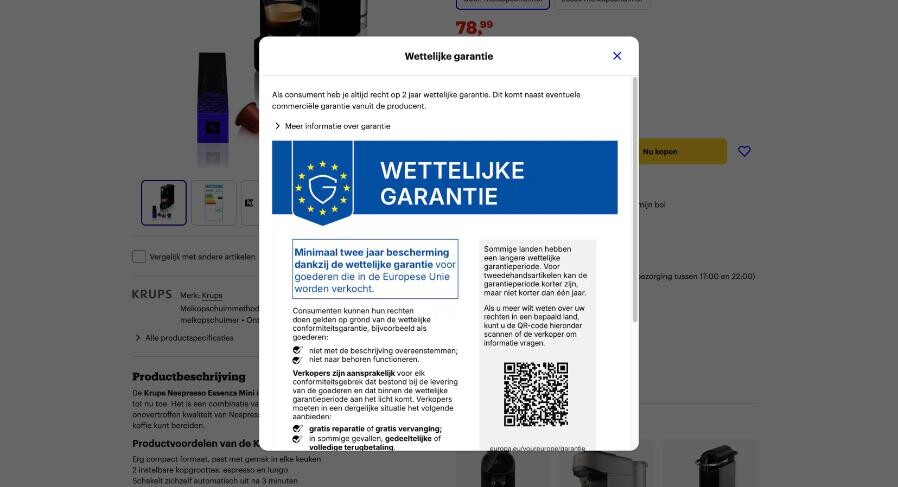
It is easy to miss: plain text in the checklist under the return terms, with no icon or badge. Neither product I checked had a GARAN label. According to bol’s partner pages, the platform adds the legal guarantee notice to product pages itself, while partners are responsible for uploading GARAN evidence for products that qualify. I did not check bol’s checkout or confirmation email.
What We Built and Measured
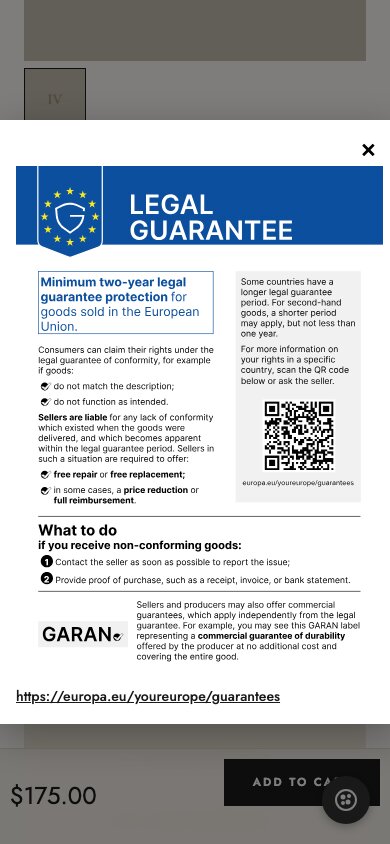
The test store is the Imagewize demo shop: the Elayne block theme, WooCommerce 11.2.1 and the Block checkout. I built the notice as a small must-use plugin limited to that site: a “Your legal guarantee rights” button in the product buy box that opens the official English notice, a copy above the checkout, and the notice plus a link in the order email. The button works without JavaScript.
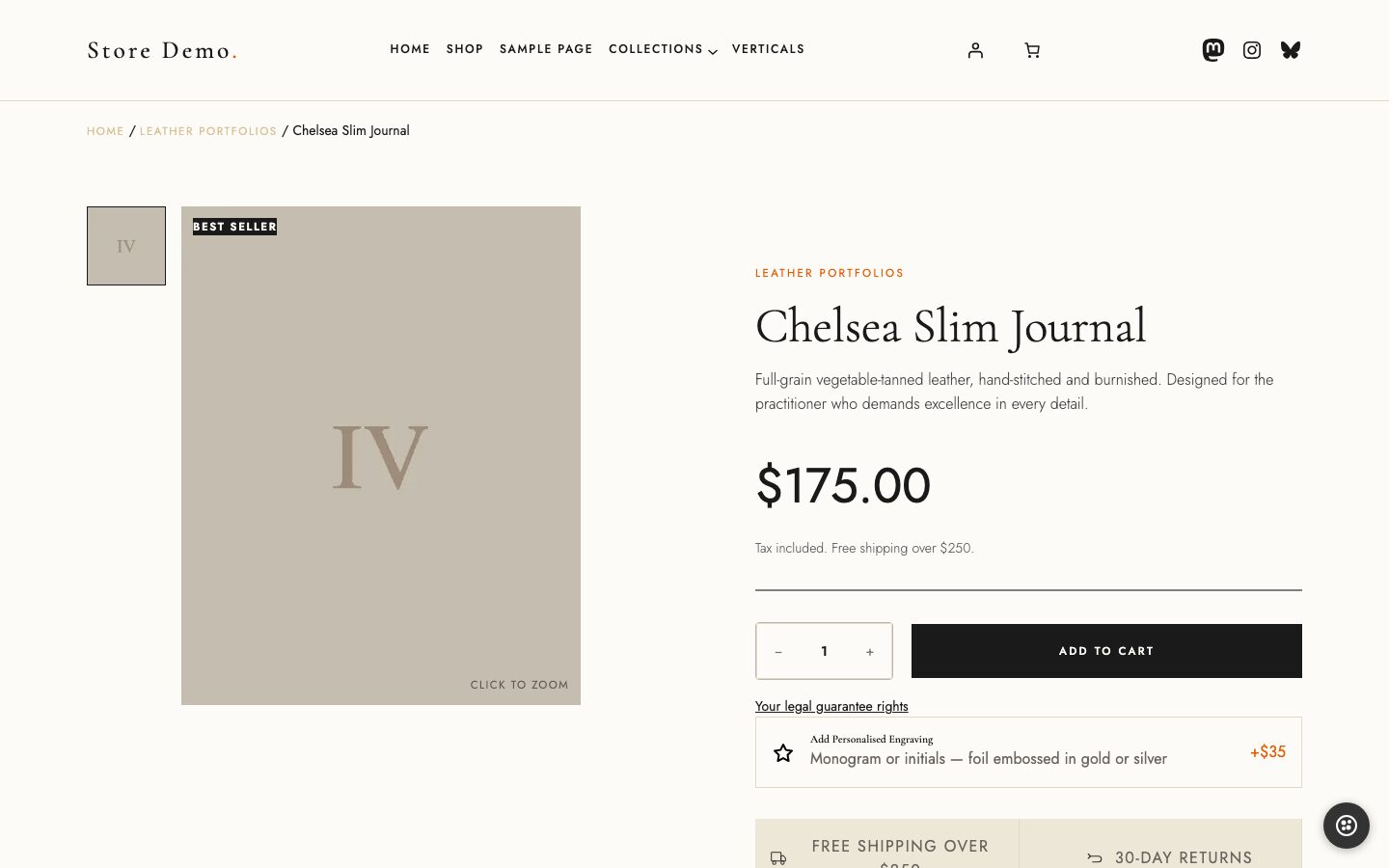
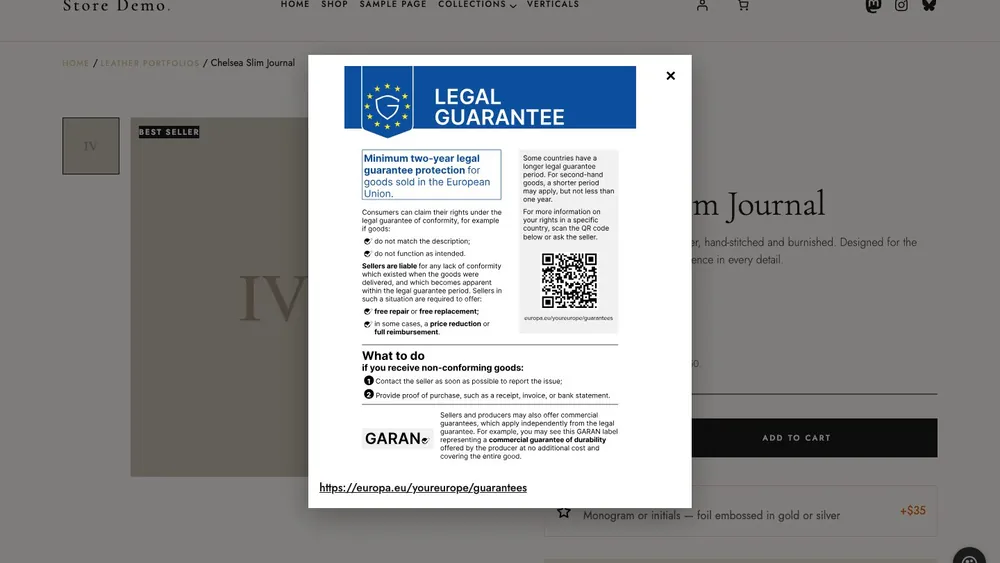
- Weight: closed, the notice costs nothing, because the image sits inside a closed element and loads lazily. Opened, it downloads 485,854 bytes, which is the official English SVG as supplied.
- Layout shift: opening the notice on the product page moved nothing (a CLS change of 0, desktop and mobile).
- Mobile: at 390 px the notice fits the width, but the body text of the A4 graphic renders at roughly 7 to 8 px. That is small next to the guidelines’ wording about legibility at default display size.
- English file: the Commission’s PNG and JPG bundle has 23 languages and no English file. The English notice is only in the SVG bundle, which is a 486 KB file made for A4 print.
The Block checkout gotcha
The first version put the notice next to the Place order button, and it vanished. Markup added inside an inner checkout block is replaced when the checkout hydrates in the browser. Classic checkout hooks do not fire on the Block checkout at all. What survived was output added before the outer checkout block. The consequence is that the notice sits above the checkout form rather than directly above the button.
For the developers: where the markup survives on Block checkout
On the Elayne product template the buy box is the woocommerce/add-to-cart-with-options block. The older woocommerce/add-to-cart-form block only appears in the mobile sticky bar, which is hidden on desktop, so a hook attached there shows nothing on a desktop product page. On the checkout, markup rendered inside woocommerce/checkout-actions-block carries a data-block-name attribute and is swapped out when React hydrates; markup added before the outer woocommerce/checkout block stays. One of the plugins below hooks the same inner block and its output did survive in my test, so I could not establish why mine did not.
Two Free Plugins, Same Store
I installed each plugin from WordPress.org on the same store, one at a time, with my own code switched off, and tested the defaults first. Both are small projects (0 and 50 active installs on October 14).
| WarrantyARK 1.2.0 | EU Warranty Ready 1.6.1 | |
|---|---|---|
| Product page on a block theme | Nothing shown | Nothing shown |
| Block checkout | Shown after enabling it (default off) | Shown, no setup |
| Order email | Off by default; PNG image when on | SVG image |
| English notice file | Own 1100 x 1554 PNG, not in the official bundle | SVG, same byte size as the official file |
| Loads on every page | 4 KB CSS + 1.5 KB JS | 6.3 KB CSS + 5.3 KB JS |
The product page result is the one to know about. Both plugins hook a classic WooCommerce product-page action that the Elayne product template does not fire, so a store on a block theme gets a checkout notice and no product-page notice, while the plugin’s CSS and JavaScript still load everywhere. Both offer a shortcode for manual placement, which I did not test on a template. I also could not confirm that WarrantyARK’s PNG is an unaltered conversion of the official notice, since the Commission does not publish an English PNG to compare it with. For EU Warranty Ready, matching the official file size suggests an unaltered copy, but that is a size match and not a file comparison.
A plugin is a reasonable choice. Test it on your own theme first, and check the page with the notice open at 390 px.
The GARAN Font Trap
If you sell a product whose producer gives a qualifying guarantee, the label has to show the years, the brand and the model. In the official SVG those are live text in the Inter typeface. Annex II of the regulation requires Inter for the label, “including for the editable fields.” But an SVG loaded as an image cannot use your site’s fonts, so when I replaced the placeholders the numbers rendered in a serif fallback. A label in the wrong typeface is not the label the regulation describes.
I fixed it by embedding a small subset of Inter in the SVG (28 KB for the digits). The two plugins handle it differently. WarrantyARK paints white boxes over the placeholders and draws the new text on top, naming Inter with Arial as the fallback. EU Warranty Ready replaces the placeholders in the official SVG as I did, and I found no font embedding in its code. I did not render its output, so whether it falls back is not confirmed.
A related trap is a theme badge. The demo store’s own product template has a hard-coded “5-year warranty” badge. The guidelines say other commercial guarantees must not be confused with the GARAN label, so check that your theme does not already show a guarantee claim of its own.
The Order Email
The Commission’s guidelines say the notice “should also be included” in the confirmation email. The word is “should,” and it rests on older consumer-rights guidance, not on the regulation, which says nothing about email.
Unverified: I put the notice in the order email as an image plus a text link, and checked it in Mailpit. I did not test it in Gmail, Apple Mail or Outlook, so I cannot say which of them display an SVG image. A raster would be safer for email, but the guidelines say not to convert the files, and the only English file is an SVG. Always include the plain-text link as well.
A Practical Checklist
- Add a visible “Your legal guarantee rights” link in the header or menu that opens the full, unaltered notice in the buyer’s language, with the Your Europe link. For German shoppers, consider showing the notice open at the checkout as well.
- Put the notice at the checkout as well, and test it on the Block checkout, not only in the editor.
- Ask your suppliers whether any product carries a free producer guarantee of more than two years. If so, show the GARAN label next to that product and again before the customer pays.
- Use the Commission’s files. Do not recolor, crop, re-type or add text to them, and use Inter for the label fields.
- Check the page at 390 px with the notice open.
- Remove or reword any theme badge that makes its own guarantee claim.
- Add the notice or the link to the order confirmation email, and send yourself a test order.
The language rule is my reading of the guidelines and not a stated requirement: the guidelines list a Your Europe URL for each of the 24 languages, so I would show the buyer’s language. The notice files come from the Commission’s publication page, which also has the guidelines.
If you are working through the other EU rules on the same store, the WooCommerce EU compliance guide links them all, including the withdrawal button and returns and refunds posts.
Frequently Asked Questions
- Do I need the EU legal guarantee notice on my WooCommerce store? If you sell goods online to consumers in the EU, yes, wherever your business is based. Regulation (EU) 2025/1960 has applied since September 27, 2026 and sets the design of the notice you must show.
- Does the notice have to appear on every product page? The Commission guidelines do not say so for the notice. They give the catalogue page, the website header and the checkout as examples of a prominent general reminder. The GARAN label is different: it has to be tied to the product and shown directly before the order is placed.
- What is the GARAN label and do I need it? GARAN is the label for a free producer guarantee of more than two years on the whole product. You only show it for products where the producer offers such a guarantee and has given you that information. You do not have to search for it.
- Can I change the colors or text of the notice? No. None of the elements of the notice can be edited, and the guidelines say not to alter colors, spacing, typography or the QR code, or to add text. On the GARAN label only the years, brand and model identifier can change, and the font must be Inter.
- Do the free WooCommerce plugins work with block themes? In my test on the Elayne block theme with Block checkout, neither WarrantyARK nor EU Warranty Ready showed the notice on the product page. Both showed it on the Block checkout. Test any plugin on your own theme before relying on it.
- What happens if my shop does not show the legal guarantee notice? It depends on the country, because each member state sets its own enforcement. In the Netherlands the consumer authority ACM enforces the new rules and can fine. In Germany, competitors and associations can send cease-and-desist letters for missing information duties. For France and Belgium I found no confirmed final law as of October 14, 2026.
Need a WooCommerce Developer for Your Store?
We build and optimize WooCommerce stores for SMEs — from custom checkout flows and payment integrations to performance tuning and ongoing maintenance. Fixed-price quotes available.
- Custom checkout and cart optimization
- Payment gateway integration (Stripe, Mollie, PayPal)
- WooCommerce performance and speed optimization
- Ongoing store maintenance and support