Winespring Is Now a Free WooCommerce Block Theme on WordPress.org
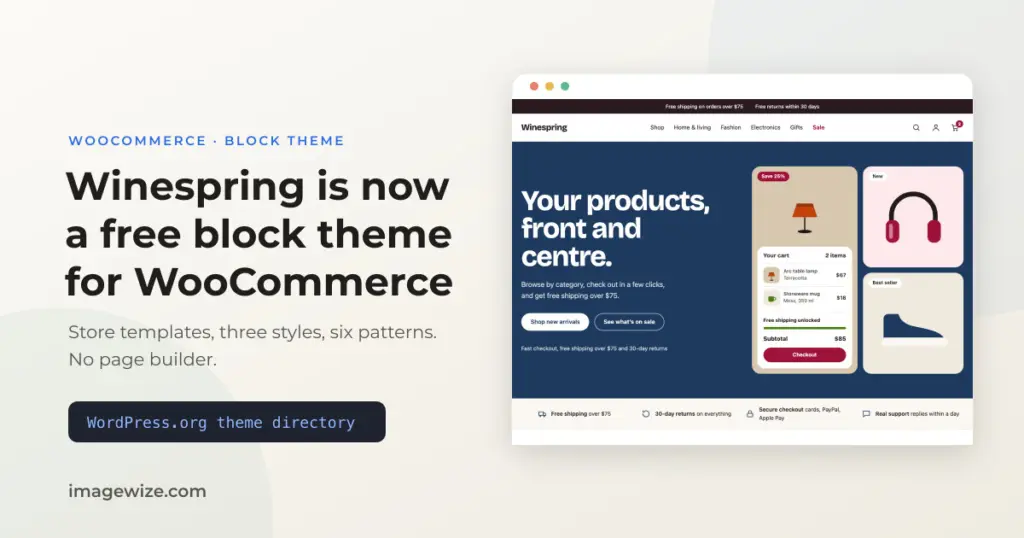
A free WooCommerce block theme has to clear a high bar: it must look finished on day one, work on a phone, and not trap you in a page builder. Most of the free ones manage two of the three. Winespring, the theme we use as the base for client stores, is now in the WordPress.org theme directory, so you can install it from Appearance → Themes without a download or a licence key.
It is also where we found that our own demo store could not sell a $22 cart on a phone. This post covers what is in the theme, what the optional Aludra plugin adds to it, what the WordPress.org review made us change, and what our own tests found.
Quick Summary: Winespring is a free, GPL-licensed block theme for WooCommerce stores. It has store templates for the product page, shop archive and search, three style variations, six page patterns and no page builder. It runs on WordPress 6.9+ and PHP 8.0+. The optional Aludra plugin adds the blocks: a mega menu, a free shipping progress bar, a sticky add to cart bar and a set of store sections. Our own tests found two gaps: small tap targets at checkout, and a sale badge that can show a bigger discount than the legal reference price supports.
Update, November 20, 2026: version 1.10.0. The first version read as a skincare store, so we added a Shop Home pattern: a general WooCommerce front page with a product mosaic, a mini cart, a trust bar, category tiles, best sellers, sale and gift-card promos and reviews. It is built from core blocks and bundled SVG art, so it needs no images and follows whichever style variation you pick. It is now the theme screenshot. Version 1.10.0 is released on GitHub; the WordPress.org directory still lists 1.9.2 while the update goes through, so Shop Home reaches directory installs once that clears. This release also fixes the product review form, where the “Save my name, email, and website” checkbox was stretched and pushed its label to the far edge.
What You Get
| Part | What it is |
|---|---|
| Store templates | Single product, shop archive and product search with a results count, sorting and a filters sidebar (price, category, availability, rating). Cart and checkout use WooCommerce’s own block templates. |
| Style variations | Store (warm retail palette), Skincare (sage and cream) and Twilight (dark with a rose accent). Switch under Appearance → Editor → Styles. |
| Page patterns | Core Home, About, Contact, FAQ, a Store Home (skincare-flavored) and, since 1.10.0, a general Shop Home with a hero and mini cart, trust bar, category tiles, best sellers, sale and gift-card promos, reviews and a closing call to action. |
| Store extras | An announcement bar, New, Sold out and Low stock badges, and sale badges that show the percentage saved. |
| Without WooCommerce | The store templates and mini cart switch off instead of showing broken blocks. |
It is deliberately small. There is no pattern library to clear out and no bundled JavaScript. Everything is core blocks, so what you build in the editor is what shoppers see, and you can leave the theme later without losing your content to shortcodes.
Winespring is the shell. The blocks come from Aludra, a free block plugin we also built, which is also in the WordPress.org directory. That split is deliberate: the directory does not let a theme ship blocks that need a plugin, so the theme stays lean and Aludra adds the shop features on top. The theme works without it.
Our own limit up front: this is our plugin and our theme, so read this part as a description, not a review. Here is what turns on when both are active:
What Aludra Adds to a Winespring Store
| Feature | What shoppers and you get |
|---|---|
| Free Shipping Progress | A bar in the announcement bar that shows how far the cart is from free shipping and updates as the cart changes. It needs a free shipping method with a minimum order amount, or it shows nothing. |
| Sticky Add to Cart | A bar with the product name, price and button that appears once the add to cart form scrolls out of view on a product page. |
| Mega menu | A full-width dropdown menu built from template parts in the Site Editor, placed inside a Navigation block. |
| Store patterns | A store hero, shop categories, newest products, a brand story, star-rated testimonials and a full store homepage, in an “Aludra: Store” category that only shows when WooCommerce is active. |
| Header: Store | A shop header with account link and mini cart, offered under Replace when you select the header in the Site Editor. |
| More blocks | 34 blocks in total, including carousel, pricing tiers, comparison table, FAQ tabs, trust bar and stat rail. Each can be switched off under Settings → Aludra. |
| Per-device control | Hide any section on phone, tablet or desktop, and on WordPress 7.1 change spacing or colors for one device only. |
The first two are the ones worth knowing about. With Aludra 2.40 or later, Winespring gets the free shipping bar and the sticky add to cart bar automatically, through WordPress’s Block Hooks API, so you do not place anything by hand. You can switch either one off under Settings → Aludra → Store.
Two limits to know. Aludra needs WordPress 7.0 or newer, while Winespring alone runs on 6.9. And in our October test the free shipping bar showed on the home page and cart but not in the checkout page’s HTML. We have not found out why yet.
What the WordPress.org Review Changed
A theme in the directory has been read by a human reviewer, which is the main reason to pick it over a random download. Ours went through two review tickets, and the notes shaped the theme you can install now:
- No plugin blocks in the theme’s own markup. We had Aludra blocks in the Store Home pattern. Directory rules do not allow a theme to ship blocks that need a plugin, so the theme now places Aludra’s bars through WordPress’s Block Hooks API, and only when the plugin is active.
- Hands off the WooCommerce admin. We removed code that changed how WooCommerce behaved in the admin screens.
- Font licences. The bundled fonts needed their open licence text and copyright notice shipped with them.
- Layout checks with the Theme Unit Test data. The reviewer’s final notes: the top menu wrapped on desktop widths, the footer layout, pagination too close to the footer, and a screenshot that showed demo colors instead of the theme’s defaults. Our own demo store’s eight-item menu needed 1004px, so it wrapped just above our old 1024px breakpoint. It now switches at 1100px.
None of this is glamorous, but it is the kind of problem a store owner hits later with a free theme from a random site: a menu that wraps onto three rows, or a footer that falls apart with real content.
What We Found Testing the Checkout on a Phone
On October 30 we ran the demo store’s checkout in a 390px wide phone emulation, from cart to order received, with WooCommerce 10.9.4 and Winespring 1.8.0. The form itself was fine: about seven fields to type, correct autofill hints and inputs large enough to avoid the iPhone zoom. Three things were not:
- Small tap targets. The payment radios and the checkboxes measured 20 by 20 pixels, and the “Add coupons” row 18 pixels tall. The Place Order button was 40 pixels tall. These are theme CSS jobs, so they were added to the fix list for Winespring.
- No shipping cost or returns link before the pay button. Until an address was entered, the page said only “Enter a shipping address to view shipping options”.
- A store setup trap, not a theme bug. The demo’s only shipping method was free shipping above $75. A $22 cart could not check out at all, and the error only appeared after pressing Place Order. This is a WooCommerce settings mistake you can make on any theme.
We tested a local demo in Chromium’s phone emulation. We did not test Apple Pay, Google Pay, iDEAL or a real device, so treat this as a list of things to check on your own store, not a verdict on the theme.
The Sale Badge Can Overstate the Discount
Winespring’s sale badge shows the percentage saved, calculated from the regular price and the sale price. On October 28 we tested what happens when a shop raises a price and then runs a sale. A product at €80 was raised to €100, then put on sale at €75. The badge showed -25%. Under the EU’s reference price rule, the discount is measured against the lowest price of the previous 30 days, which was €80, so the real cut is about 6%.
Core WooCommerce keeps no price history. The €80 was in no postmeta, no lookup table and no revision. A price-history plugin fixed the reference price, but only for changes made after it was installed. The theme’s badge is our own code and it does not know about the plugin. If you sell in the EU and run sales, turn the percentage off or check it against your reference price. Our Dutch guide to strike-through prices explains the rule, and we also tested the EU legal guarantee notice on a block theme store. We have not fixed this yet. This is not legal advice.
Who It Is For
See the Winespring theme page and the live demo for the full picture. Winespring suits a small shop that wants to start from a clean block theme and edit its own pages. It also suits a developer or agency that wants a free base to fork for a client. If you need a long list of ready-made page layouts, a page builder or built-in subscriptions, look elsewhere, or see our other themes if you want a general business theme instead of a store one. If your store already has traffic and a theme you do not trust, a WooCommerce developer can take over the site and check the checkout, and you can start with the free store checkup.
For the developers: install, fork and demo data
You can install it from the directory, from a release zip on GitHub, or with Composer.
composer require imagewize/winespringThe repository is a GitHub template. Create a new repo from it, run the “Rename theme from template” workflow and merge the pull request it opens. The workflow renames the identifiers, and you finish the README, palette, patterns and screenshot by hand. A separate demo-content repo seeds 16 skincare products so you can see the templates with real data. The theme registers a menu template part area so Aludra’s mega menu parts show up in the Site Editor.
Frequently Asked Questions
- Is Winespring really free? Yes. It is GPL licensed and free in the WordPress.org theme directory, with no paid tier needed for the features described here.
- Do I need WooCommerce and Aludra to use Winespring? You need WooCommerce for the store templates. Aludra is optional and adds the mega menu, free shipping bar and sticky add to cart bar.
- What does Aludra add to Winespring? A free shipping progress bar, a sticky add to cart bar, a mega menu, store page sections and 34 blocks in total. Aludra needs WordPress 7.0 or newer.
- What do I need to run Winespring? WordPress 6.9 or newer and PHP 8.0 or newer.
- Can I use Winespring for a client store? Yes. The license allows it, and the GitHub repository is a template you can fork and rename for each client.
Need a WooCommerce Developer for Your Store?
We build and optimize WooCommerce stores for SMEs — from custom checkout flows and payment integrations to performance tuning and ongoing maintenance. Fixed-price quotes available.
- Custom checkout and cart optimization
- Payment gateway integration (Stripe, Mollie, PayPal)
- WooCommerce performance and speed optimization
- Ongoing store maintenance and support