How We Test a WooCommerce Checkout Before Launch — and What It Caught
The nastiest checkout bug is the quiet one: the Place Order button that does nothing, the confirmation email that never arrives. Every page looks fine, the admin shows no error, and the shopper who hits it does not report anything — they just leave and buy somewhere else. A proper WooCommerce checkout test before launch catches these before your customers do, so we broke a checkout five ways on purpose, on a local copy of a store, and watched what an automated check actually catches.
I’m a Dutch developer who builds and tests WooCommerce stores from Asia — your shop runs on EU servers, and a message you send in the evening is handled while you sleep. Here is what “we tested your checkout before launch” means in practice, including what our own check missed.
Quick summary: Before any store we build goes live we run nine automated checkout checks — shop, product, cart, checkout — then place a real test order with an offline payment method, verify the confirmation email, and delete the test order, plus a phone-width pass at 390 pixels. When we planted five breaks in a demo checkout, the full run caught four of five; the fifth only showed up as a slower timing. This post is what we check, what we found, and the honest limits.
We broke a checkout five ways — here is what the check caught
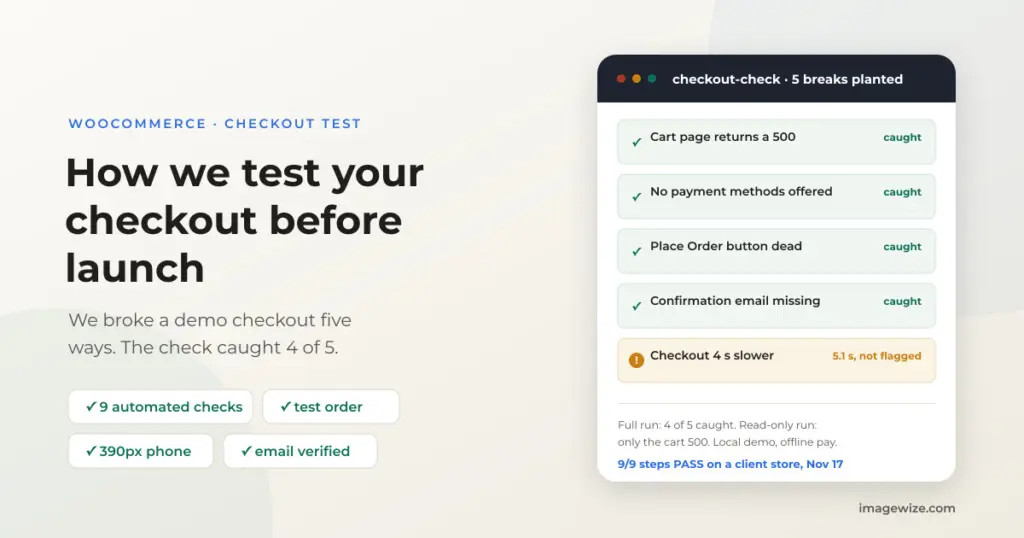
On November 7 we planted five breaks, one at a time, in a local copy of our Winespring demo store — block checkout, offline payment — using a throwaway plugin we removed afterwards. Then we ran our checkout check on each break:
| Break we planted | Read-only check | Full run with a test order |
|---|---|---|
| Cart page returns a 500 error | Caught | Caught |
| No payment methods offered | Missed — a bug in our own script counted the empty list as one method; fixed the same day | Caught |
| Place Order button does nothing | Missed | Caught |
| Confirmation email never sends | Missed | Caught |
| Checkout 4 seconds slower | Not flagged — showed as a 5.1 s timing | Not flagged — 5.1 s |
The full run caught four of the five. The fifth never appeared as an error at all, only as a number: 5.1 seconds on a checkout that normally takes about 1 second. A page check cannot tell you that; a per-step timing can. And to be honest about our own tool: the read-only run passing the no-payment break was a bug in our check, not a feature — an empty payment list was counted as one method. We fixed it in the same release and re-ran the test.
Our WooCommerce checkout test before launch: the nine checks
The check drives a real browser through the store, step by step, and reports a pass, fail or skip plus a timing for each:
- The shop page loads and lists products.
- A category page loads.
- A product page shows the price and an add-to-cart button.
- Adding to cart works — including picking a variation — from the product page and from the shop grid, and the cart count updates.
- The cart page shows the line and the totals add up, cross-checked against WooCommerce’s Store API cart, not just what the page claims.
- The checkout page loads, the billing fields render and the payment methods appear — block and shortcode checkouts both work.
- A test order: the form filled with marked test data, an offline payment method (cash on delivery or bank transfer — never a real card), the order placed, and the order-received page showing the order number.
- The confirmation email arrives — on a local copy we catch it in Mailpit or MailHog and verify it.
- Cleanup: the test order is read back, found by its marker in the billing email, and deleted. Only marked orders are ever removed.
On November 17 this passed all nine steps on a client store — test orders #16616 and #16617, confirmation emails verified, both orders removed afterwards and the order count back to normal. The per-step timings on our runs: cart and checkout load in 0.5–1.1 seconds uncached, and about 1.3–1.7 seconds from pressing Place Order to the confirmation page. One limit we state openly: that client store is not a Winespring build, and quote-style products — a configurator that produces a quote instead of a cart — are still verified by hand at review.
Then the phone pass — and the cheapest product first
The automated walk runs at desktop width, so we add a phone pass at 390 pixels on top of it. On October 30 we walked our own Winespring demo store’s checkout on a phone (WooCommerce 10.9.4) from start to finish. The form itself was fine — about seven fields, autofill worked, inputs did not trigger zoom. Then we found the problems: a $22 cart failed with “No shipping options are available,” but only after pressing Place Order, because the store’s only shipping method was free shipping above $75. The payment buttons and checkboxes measured 20 pixels wide — under the 24-pixel minimum for comfortable tapping — and nothing showed what shipping would cost, or where the returns policy was, before the Place Order button — showing the distance to free shipping is exactly what our free-shipping progress bar block adds.
That is why the first test order we place is always for the cheapest product, on a phone, and why shipping costs and the returns link belong above the button, not below it. If the button does nothing at all, our Place Order troubleshooting post shows how to tell the three failure types apart. The full EU version of this pass — iDEAL via Mollie, shipping zones, VAT/OSS, the withdrawal button, GPSR — is in our WooCommerce launch checklist for EU stores.
A test order is a real order to your systems
Cleanup deletes the order, but it cannot undo what already fired: the customer and admin emails, the payment-provider webhook, any ERP or fulfilment sync. And a local copy can still carry real addresses — on one client copy, the new-order emails were still addressed to the client’s real inbox; the local mail catcher is what made that safe instead of embarrassing.
So the rules we work by: test orders go on a local or staging copy, or on production only with the owner’s written permission; payment is an offline method or the gateway’s test mode, never a real card charge; test orders carry a marker and only marked orders are deleted; and before the first test order we check where a copy’s mail actually goes.
What “tested before launch” means when we build your store
When we build your store, this check is part of the launch checklist included in the fixed price — not a line item you have to think about. The same nine steps plus the phone pass run on your shop before it goes live, and the per-step timings double as a speed check: cart and checkout bypass the page cache, so a slow checkout shows up as a number even when nothing is broken. Our theme for store builds is Winespring, and the test runs against whatever payment setup you actually use.
Already have a store and want to know whether buying still works? Start with the free WooCommerce store audit — the read-only version of this check also runs safely on a live shop, because it never places an order.
For the developers: the checkout check we run
We built this as wp-ops checkout-check (open source, MIT). Without flags it is read-only and safe on a live store; the guard refuses to place an order on a production-looking host without --allow-production:
wp-ops checkout-check https://shop.example
wp-ops checkout-check https://shop.example --place-order --payment cod \
  --mailhog http://localhost:8025 \
  --cleanup --wp "wp --path=web/wp"
Test orders carry a marker in the billing email and --cleanup deletes only marked orders, after reading each one back. The November 17 run on the client store scored 9/9 PASS.
Frequently Asked Questions
- Should I place a test order in my live shop? Not without precautions. On a live shop a test order triggers real emails and webhooks. Use a local or staging copy, or the payment gateway’s test mode, and place an order on production only with the owner’s written permission.
- Can I test with a real card payment? Use the gateway’s test mode (Mollie, Stripe) or an offline method like bank transfer. Never run a real card charge as a “test.”
- Why test the checkout on a phone? Most store traffic is mobile, and most checkout bugs — small tap targets, zooming inputs, shipping errors that only appear after Place Order — only show at phone width. Our $22-cart bug was invisible on desktop.
- What did your own tests catch? On our demo store: a $22 cart that could not check out because free shipping above $75 was the only shipping method, and 20-pixel tap targets on the payment buttons. In the planted-break run, our full check caught 4 of 5 planted breaks; a 4-second slowdown only showed up as a 5.1-second timing.
- How do I remove test orders afterwards? Delete them by a marker — we mark the billing email — through WP-CLI, and remember that cleanup cannot undo the emails or webhooks that already fired.
- How long does a checkout test take? The read-only walk finishes in minutes and reports a pass/fail and a timing per step. A full run with a test order adds the order itself, the email check and the cleanup — minutes more, and included in our launch checklist.
Need a WooCommerce Developer for Your Store?
We build and optimize WooCommerce stores for SMEs — from custom checkout flows and payment integrations to performance tuning and ongoing maintenance. Fixed-price quotes available.
- Custom checkout and cart optimization
- Payment gateway integration (Stripe, Mollie, PayPal)
- WooCommerce performance and speed optimization
- Ongoing store maintenance and support