The WooCommerce Launch Checklist We Run for Every EU Store
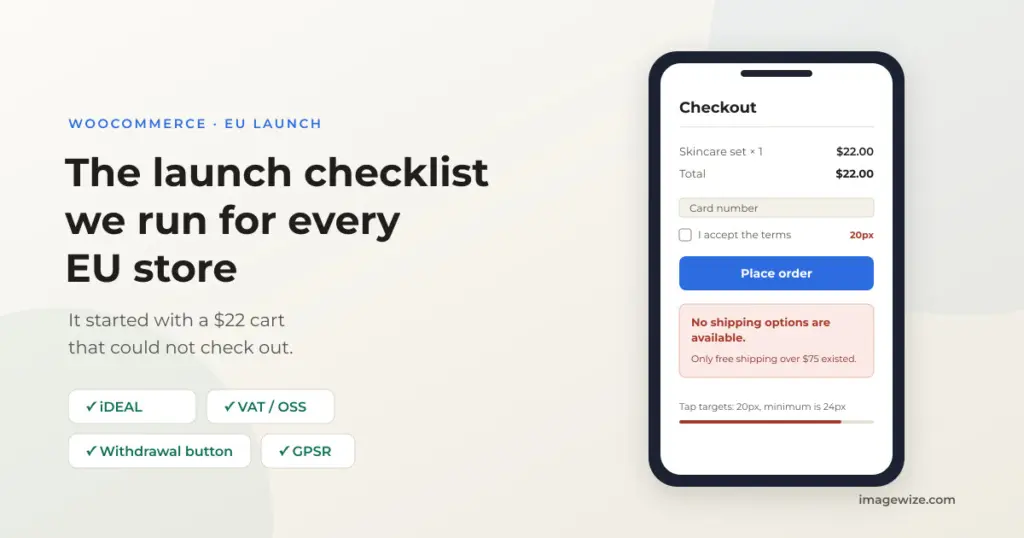
A shopper with a small cart is the first person to find a broken checkout — and the least likely to tell you about it. They hit an error after pressing Place Order, assume the store is broken, and leave. We found exactly that bug on our own demo store last month, and it is why every store we build goes through the same launch checklist below before it goes live.
I’m a Dutch developer building WooCommerce stores from Asia, so your shop is hosted on EU servers and a message you send in the evening is handled while you sleep.
Quick summary: Before any EU WooCommerce store goes live we check the local payment method (iDEAL via Mollie in the Netherlands, Bancontact in Belgium), shipping options on a small cart, the 14-day withdrawal button, the legal guarantee notice, GPSR product information, VAT/OSS, and the checkout on a phone 390 pixels wide — finishing with a real test order and a verified confirmation email. This post is that checklist, including the $22-cart bug we caught on our own demo store.
The $22 cart: why we always test the cheapest product first
On October 30 we tested our own demo store the way a customer would: on a phone, 390 pixels wide, starting to finish. The checkout form itself was fine — about seven fields, autofill worked, the page did not zoom. Then we tried a $22 cart and got “No shipping options are available,” but only after pressing Place Order. The cause was a setting, not the theme: the store’s only shipping method was free shipping above $75, so a small cart had no valid option. Two more findings from the same walk: the payment buttons and checkboxes measured 20 pixels wide, under the 24-pixel minimum for comfortable tapping, and nothing showed what shipping would cost — or where the returns policy was — until an address was typed in.
None of this would have shown up in the admin. There was no error on our screen and no complaint in our inbox; a shopper with a $22 cart would simply have left. That is why the first test order we place is always for the cheapest product, on a phone, with an address from another country.
The launch checklist we run for every EU store
Most “launch checklist” articles are generic. EU stores fail in specific places, so ours is specific. Each item links to the full guide we published for it.
- Payments the customer expects. In the Netherlands that means iDEAL (roughly 70% of online transactions), in Belgium Bancontact, in Germany Klarna or SEPA. We default to Mollie — iDEAL at a flat €0.29, no monthly fee — with Stripe as the alternative for card-heavy stores. Test mode first, then live API keys and the webhook URL, and one real test payment in each.
- Shipping options on a small cart. Set up zones for NL/BE/DE and the rest of the EU with flat rates, and make sure a cart below your free-shipping threshold still sees a paid option — the $22-cart bug above. Show shipping costs before the Place Order button, not after it.
- The EU legal pages. The 14-day withdrawal button, a returns and refunds policy, the legal guarantee notice, and GPSR product information (safety data, manufacturer details) on product pages. The EU compliance hub links all eight guides.
- VAT, including OSS. Below €10,000 in EU cross-border sales you can use the One Stop Shop; above it, register in each country. B2B sales use the reverse-charge rule with a VIES check.
- The checkout on a phone. Walk it at 390 pixels wide: tap targets at least 24 pixels, no zooming on inputs, and errors visible before Place Order. If the button does nothing, our Place Order troubleshooting post shows how to tell the three failure types apart.
- Accessibility basics. The European Accessibility Act applies to most stores; check contrast, labels and keyboard navigation against our EAA guide.
- Speed and SEO basics. Meta titles and descriptions per page (we use The SEO Framework, not Yoast), a generated sitemap, WebP images with descriptive filenames. Run your store through the free WooCommerce audit before launch.
- A real test order, then cleanup. Place an actual order in payment test mode, confirm the confirmation email arrived, then delete the test order. See below for what we automate.
- Launch day itself. DNS pointed at the EU server, SSL certificate active, the store in maintenance mode until the legal texts are in, and an indexing request in Google Search Console once it is public.
What “tested” actually means
“We tested it” can mean someone clicked around for five minutes. For a store that takes money, we mean something stricter: an automated check that walks the shop page, opens a product, fills the cart, completes checkout, places the order, verifies the confirmation email, and then deletes the test order. Our latest run passed all nine steps on a client store on November 17 — test orders #16616 and #16617, confirmation emails verified in MailHog, both orders removed afterward. One honest limit: that store is not a Winespring build, and quote-style products (a configurator that produces a quote instead of a cart) are still verified by hand at review.
For the developers: the checkout check we run
We built this as wp-ops checkout-check (open source, MIT). It drives a headless browser through the store and can place a real test order in a payment gateway’s test mode:
wp-ops checkout-check https://shop.example \
  --place-order --payment cod \
  --mailhog http://localhost:8025 \
  --cleanup --wp "wp --path=web/wp"
Test orders carry a marker in the billing email and --cleanup deletes only marked orders, after reading each one back. The Nov 17 run on the client store scored 9/9 PASS.
Frequently Asked Questions
- Do I really need iDEAL at checkout? If you sell to Dutch consumers, yes — it handles around 70% of online payments in the Netherlands. Showing only a credit-card form measurably costs you sales.
- What is OSS VAT and do I need it? The One Stop Shop lets you declare EU cross-border VAT in one country while you stay under €10,000 in EU sales. Above that, or if you stock goods in another EU country, you need local registrations.
- Is the 14-day withdrawal button mandatory? Yes, for EU consumer stores — Article 11a of the Consumer Rights Directive requires a clearly visible button since June 19, 2026. WooCommerce 11.1 ships a withdrawal form; test that the customer email shows the date and time.
- What does GPSR require on my product pages? From December 13, 2024, products sold in the EU need manufacturer/importer details and safety information reachable from the product page. Digital products and food have their own rules.
- Why test the checkout on a phone? Most EU store traffic is mobile, and most checkout bugs — tap targets, zoom, shipping errors that only appear after Place Order — only show at phone width. Our $22-cart bug was invisible on desktop.
- How long does a launch take after the build? Days, not weeks — mostly waiting on your product texts and legal pages. The checklist above takes us a day, including the test orders.
Need a WooCommerce Developer for Your Store?
We build and optimize WooCommerce stores for SMEs — from custom checkout flows and payment integrations to performance tuning and ongoing maintenance. Fixed-price quotes available.
- Custom checkout and cart optimization
- Payment gateway integration (Stripe, Mollie, PayPal)
- WooCommerce performance and speed optimization
- Ongoing store maintenance and support